Quick Start Guide for Denon Home 150NV Compact Speaker
Get started with your Denon Home 150NV compact speaker. This quick guide covers the essential steps for power connection and initial setup using the HEOS app.
Quick Start Guide
This guide provides the essential steps to set up your Denon Home 150NV compact speaker. Follow these instructions to get your device connected and ready for use.
Setup Instructions
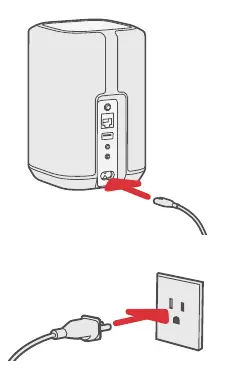
- Connect to power: Locate the power input on the back of the Denon Home 150NV speaker. Connect the provided power cable to the speaker and plug the other end into a standard wall power outlet.
- Set up with the HEOS app: Download and install the HEOS app on your smartphone or tablet. Open the app and follow the on-screen instructions to complete the configuration of your speaker and connect it to your network.
Manufacturer information
Denon
Practical help
Before use
- Ensure you have a power outlet available near the speaker location.
- Download the HEOS app from the Apple App Store or Google Play Store.
- Ensure your mobile device is connected to your local Wi-Fi network before starting the setup.
Images and diagrams
- The diagram illustrates the power cable connection to the rear port of the speaker and the wall outlet.
- The diagram shows the HEOS app icon and a QR code to facilitate the download of the setup application.

Manual page author
Emily Carter
User documentation editor
Prepares concise manual descriptions and highlights the most useful setup, operation, and maintenance information for readers.