Denon Home 150NV Compact Speaker Setup Guide
Quick start guide for the Denon Home 150NV compact speaker, covering power connection and HEOS app configuration.
Table of contents
Product Overview
The Denon Home 150NV is a compact, high-performance wireless speaker designed to deliver exceptional audio quality in a small footprint. It is part of the Denon Home series, which integrates seamlessly into your home network to provide multi-room audio capabilities.
Getting Started
Setting up your Denon Home 150NV is a straightforward process designed to get you listening to your favorite music as quickly as possible. Follow these steps to begin:
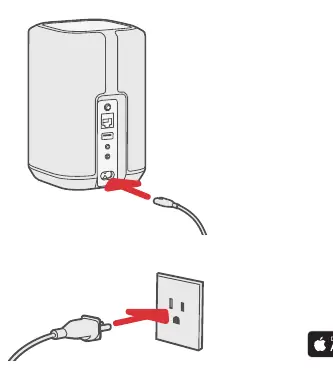
- Connect to Power: Locate the power input on the back of the speaker. Connect the provided power cord to the speaker and then plug it into a standard wall outlet. Ensure the connection is secure.
- Download the HEOS App: The HEOS app is the central control hub for your Denon Home speaker. Download the app from the Apple App Store or Google Play Store on your smartphone or tablet.
- Configure Your Device: Open the HEOS app and follow the on-screen instructions to connect your speaker to your home Wi-Fi network. The app will guide you through the pairing process to ensure your device is ready for use.
Usage and Maintenance
Once configured, you can control your Denon Home 150NV directly through the HEOS app. This allows you to stream music from various online services, local network storage, or mobile devices. To maintain the best performance, keep the speaker in a dry environment and avoid placing it in direct sunlight or near heat sources. Clean the exterior with a soft, dry cloth; do not use chemical cleaners or solvents.
Troubleshooting
If you encounter issues during setup or operation, ensure that your mobile device is connected to the same Wi-Fi network you intend to use for the speaker. If the speaker is not detected by the app, try power cycling the device by unplugging it for 10 seconds and plugging it back in. Ensure your router is functioning correctly and that the speaker is within range of a strong Wi-Fi signal.
Safety and Disposal
Always use the provided power cable. Do not attempt to open the speaker casing, as this may void your warranty and poses a risk of electric shock. When disposing of the device, please follow local regulations regarding electronic waste to ensure it is recycled responsibly.