User Manual for DeWalt TWS 209A True Wireless Earbuds
Quick guide for the DeWalt TWS 209A True Wireless Earbuds. Learn how to pair your earbuds, charge the case, and view technical specifications.
Table of contents
Quick guide from the manual
This document provides essential information regarding the operation and technical specifications of the DeWalt TWS 209A True Wireless Earbuds.
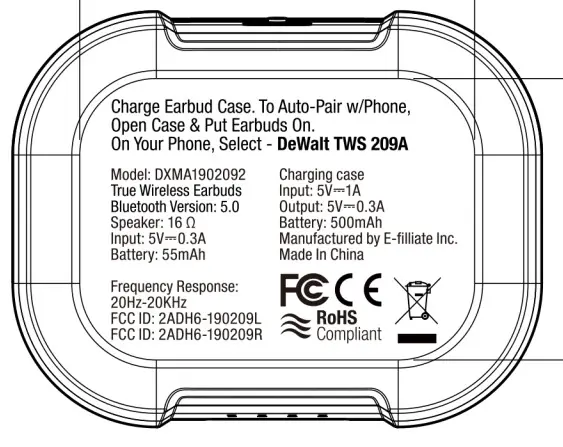
Pairing
To pair the earbuds with your phone:
- Open the charging case.
- Put the earbuds on.
- On your phone, search for and select DeWalt TWS 209A in the Bluetooth settings.
Charging
Ensure the earbud case is charged to maintain battery life for the earbuds. The charging case input is 5V 1A.
Technical Specifications
The following technical parameters apply to the DeWalt TWS 209A:
- Bluetooth Version: 5.0
- Speaker Impedance: 16 Ohm
- Frequency Response: 20Hz-20KHz
- Earbud Battery: 55mAh
- Charging Case Battery: 500mAh
- Earbuds Input: 5V 0.3A
Manufacturer information
DEWALT
Practical help
Before use
- Charge the earbud case fully before first use
- Ensure Bluetooth is enabled on your mobile device
- Open the case and put the earbuds on to initiate pairing mode
Specs in practice
- Bluetooth Version
- 5.0 - Indicates the wireless connectivity standard used for pairing
- Battery (Case)
- 500mAh - Total capacity of the charging case
- Battery (Earbuds)
- 55mAh - Capacity of the individual earbuds

Manual page author
David Miller
Documentation analyst
Organizes user manual content into clear summaries, with attention to model details, product context, and everyday usability.