Computers / Storage
How to Format a 16GB USB Drive for Vigor2927 Syslog Storage
A step-by-step guide on how to format a 16GB USB drive using Macrorit Partition Expert to ensure compatibility with Draytek Vigor2927 for storing Syslog records.
Table of contents
Overview
To store Syslog records on a Draytek Vigor2927 router, the USB drive must be correctly formatted. This guide explains how to use the Macrorit Partition Expert software to prepare a 16GB USB drive for this purpose.
Software Preparation
Download the portable version of Macrorit Partition Expert. Extract the files and run the appropriate executable (dm.exe) from either the x86 or x64 folder, depending on your operating system architecture.
Formatting the USB Drive
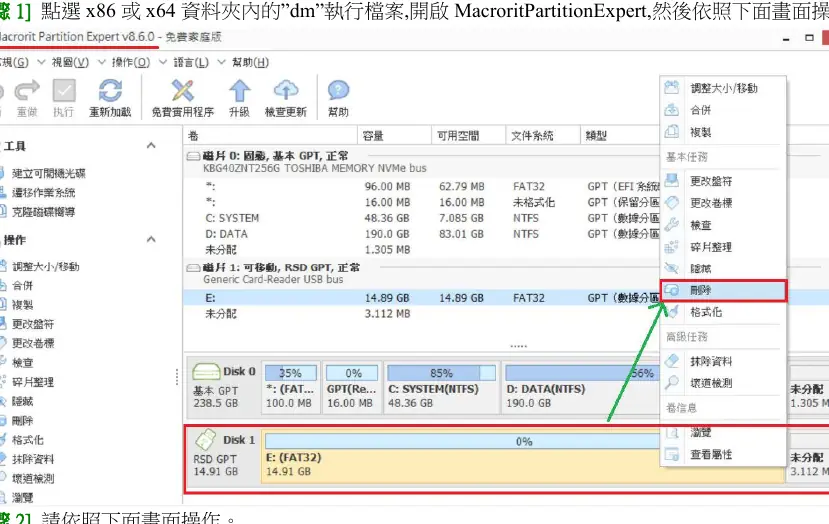
- Open Macrorit Partition Expert and identify your USB drive in the disk list.
- Select the format option for the USB drive.
- Ensure the file system is set to FAT32, as this is required for compatibility with the Vigor2927.
- Apply the changes to complete the formatting process.
Configuring the Vigor2927
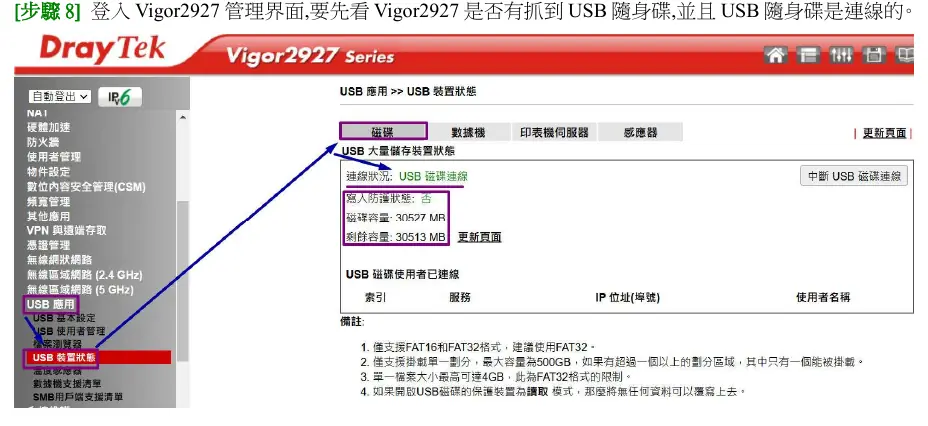
Once formatted, insert the USB drive into the Vigor2927 USB port. Log in to the router's management interface to verify that the device is detected and connected. Navigate to the USB application settings to configure the Syslog storage path. Ensure the router is set to save logs to the USB drive. After configuration, the router will automatically create a Syslog folder and generate daily log files named by date.
Important Considerations
- The Vigor2927 supports FAT16 and FAT32 file systems; FAT32 is recommended.
- The router can mount one partition at a time, with a maximum supported size of 500GB.
- Individual file sizes are limited to 4GB due to FAT32 constraints.
- Ensure the USB drive remains connected for continuous logging.
Related manuals
Related manuals from the same brand or category.

Manual page author
David Miller
Documentation analyst
Organizes user manual content into clear summaries, with attention to model details, product context, and everyday usability.