E-flite Commander mPd 1.4m
Comprehensive instruction manual for the E-flite Commander mPd 1.4m RC aircraft, covering assembly, transmitter setup, SAFE Select technology, and maintenance.
Table of contents
Manual images
Jump to the sectionProduct Overview
The E-flite Commander mPd 1.4m is a sophisticated RC hobby aircraft designed for performance and ease of use. It features advanced flight technologies including AS3X stabilization and SAFE Select, which provides angle limits and automatic self-leveling to assist pilots of various skill levels. The aircraft is available in BNF (Bind-N-Fly) and PNP (Plug-N-Play) versions, requiring a 6-channel transmitter with Spektrum DSMX technology for optimal operation.
Safety and Precautions
Operating this model requires caution and common sense. Always maintain a safe distance from people and obstacles. Never operate the aircraft with low transmitter batteries, and ensure the aircraft is kept in sight at all times. Always remove the flight battery after use and before any disassembly or maintenance. The model is not intended for children under 14 years of age.
Assembly and Setup
Assembly involves installing the landing gear, horizontal tail, and wings using the provided hardware. The propeller must be installed correctly, with specific usage guidelines for 3S and 4S batteries. Transmitter setup is critical; users should download pre-programmed setup files from the manufacturer's website or manually configure the radio for correct flap and switch assignments. Before the first flight, perform a control direction test and an AS3X response test to ensure all surfaces move correctly.
Flight and Maintenance
During flight, use the transmitter trim switches to achieve level flight, ensuring the aircraft is in AS3X mode. After landing, disconnect the battery immediately to preserve its life. Regular maintenance includes checking for loose parts, ensuring the propeller is balanced, and keeping moving parts clean. If the aircraft exhibits inconsistent performance or oscillation, consult the troubleshooting guide to check for mechanical issues or incorrect trim settings.
Troubleshooting and Support
If the aircraft fails to bind or connect, ensure the transmitter is at a sufficient distance and that no large metal objects are interfering with the signal. For motor issues, verify that the ESC is properly connected and that the battery is within the recommended specifications. Always use genuine Spektrum components to ensure compatibility and performance.
Practical help
Common problems
Check for damaged/imbalanced propeller, loose receiver, or worn control parts.
Move transmitter further away, ensure bind plug is installed correctly, or check battery charge.
Check if LVC (Low Voltage Cutoff) is triggered; recharge or replace battery.
Perform a control direction test and reverse channels in the transmitter settings.
Before use
- Ensure transmitter is fully charged and programmed.
- Verify control surfaces move in the correct direction.
- Check that the propeller is securely tightened.
- Confirm the battery is fully charged and secured.
- Ensure the aircraft is kept immobile for 5 seconds after battery connection for initialization.
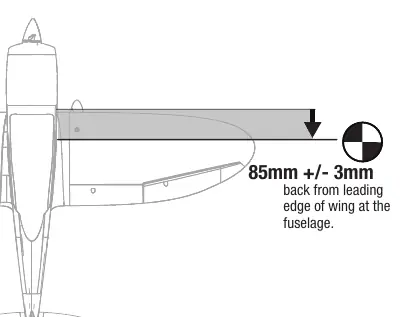
- Verify the Center of Gravity (CG) is at 85mm +/- 3mm from the leading edge.
Images and diagrams
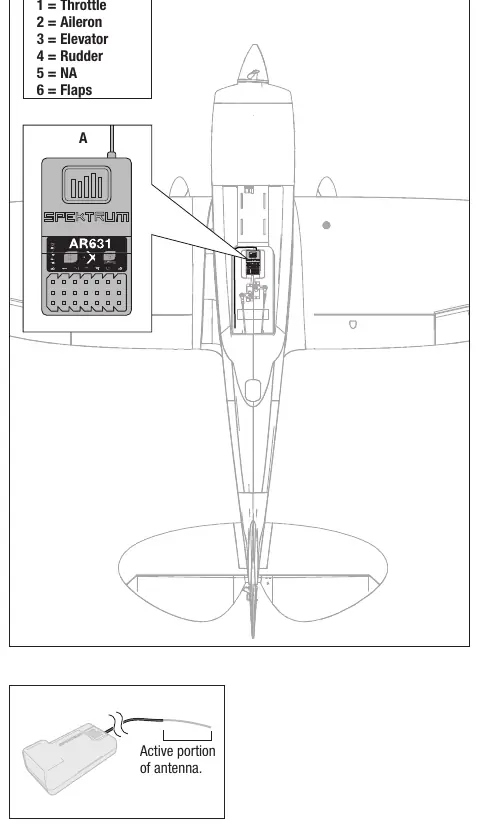
- The receiver port assignment table shows the correct connection for throttle, aileron, elevator, rudder, and flaps.
- The CG diagram indicates the balance point measured from the wing's leading edge.
- The transmitter setup table provides specific switch and travel values for various Spektrum radios.
Model compatibility
- Requires a full-range 6-channel transmitter with Spektrum DSMX technology.
- Compatible with 3S or 4S LiPo batteries (4S 2200mAh recommended).
- Propeller usage: 12x6E for 4S, 13x8E for 3S.

Manual page author
Emily Carter
User documentation editor
Prepares concise manual descriptions and highlights the most useful setup, operation, and maintenance information for readers.