Wireless Sport Earbuds 17LY86BK User Guide
Comprehensive user guide for the 17LY86BK Wireless Sport Earbuds, covering setup, Bluetooth pairing, music control, call management, charging, and troubleshooting.
Table of contents
Product Overview
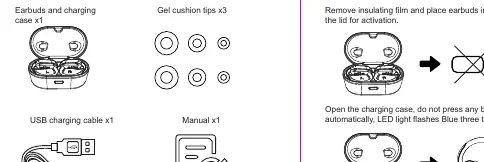
The 17LY86BK Wireless Sport Earbuds are designed for active use, offering a secure fit with included gel cushion tips. The package includes the earbuds with a charging case, three sizes of gel cushion tips, a USB charging cable, and a user manual.
Powering On and Off
To activate the earbuds for the first time, remove the insulating film, place them in the charging case, and close the lid. The earbuds power on automatically when the case is opened. You can also manually power them on by pressing and holding the button for 3 seconds, or power them off by holding for 5 seconds.
Bluetooth Pairing
When the charging case is opened, the earbuds automatically enter pairing mode. Search for TWS EARBUDS on your device to connect. The earbuds will automatically reconnect to the last paired device. To pair with a new device, ensure the previous device's Bluetooth is disconnected or disabled.
Operation and Controls
- Play/Pause: Single click either earbud.
- Next Track: Press and hold the right earbud.
- Previous Track: Press and hold the left earbud.
- Volume Control: Single click the left earbud to decrease volume, and the right earbud to increase volume.
- Calls: Single click to answer or hang up; press and hold for 1 second to reject an incoming call.
- Voice Assistant: Double-click either earbud.
Charging
Place the earbuds into the charging case to charge. The case LED will remain lit while charging and turn off when the earbuds are fully charged. The charging case itself takes approximately 2.5 hours to fully charge, indicated by four blue LEDs flashing in turn and remaining solid when complete.
Troubleshooting
If you encounter issues, consider the following steps:
- Cannot power on: Charge the device for 30 minutes.
- Bluetooth not found: Ensure the earbuds are in pairing mode (flashing red/blue) and clear the previous pairing list on your phone.
- No sound: Check the volume levels on both the earbuds and your connected device, or re-establish the Bluetooth connection.
- Charging issues: Verify the charging cable is secure and the case lid is properly closed.

Manual page author
David Miller
Documentation analyst
Organizes user manual content into clear summaries, with attention to model details, product context, and everyday usability.