User Guide for Eaton Tripp Lite NPOE-30W-1G-INT PoE+ Midspan Injector
Quick start guide for the Eaton Tripp Lite NPOE-30W-1G-INT 1-Port Gigabit High-Power PoE+ Midspan Injector. Includes installation steps, connection instructions, and warranty details.
Table of contents
Quick guide from the manual
This document provides the necessary steps to install and connect the Eaton Tripp Lite NPOE-30W-1G-INT 1-Port Gigabit High-Power PoE+ Midspan Injector. This device is designed to provide power and data over a single Ethernet cable to IEEE 802.3af/at-compliant devices.
Installation
Follow these steps to install the injector:
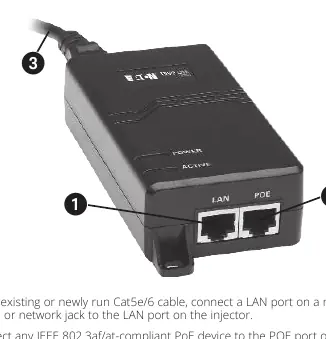
- Connect Network Input: Using an existing or newly run Cat5e/6 cable, connect a LAN port on a non-PoE switch or network jack to the LAN port on the injector.
- Connect PoE Device: Connect any IEEE 802.3af/at-compliant PoE device to the POE port on the injector.
- Connect Power: Use the included power cable to connect the injector to an AC outlet.
Warranty
The product includes a 3-year limited warranty covering defects in materials and workmanship. This warranty does not apply to equipment damaged by accident, negligence, or misapplication. Before sending any equipment back for repair, visit Tripplite.Eaton.com/support/product-returns.
Official resources from the manual
Manufacturer information
Eaton
Practical help
Before use
- Ensure you have a Cat5e/6 Ethernet cable.
- Verify that your network device is a non-PoE switch or network jack.
- Confirm that the device you intend to power is IEEE 802.3af/at-compliant.
- Ensure an AC power outlet is available for the injector.
Images and diagrams
- The injector features three main connection points: a LAN port for network data input, a POE port for the powered device, and a power input port for the AC cable.

Manual page author
Michael Turner
Technical manual editor
Reviews PDF manuals for structure, safety notes, and practical product details so readers can find the right information quickly.