User Manual for Einhell TP-CD 18/50 Li-i BL Cordless Hammer Drill
Quick guide and user manual for the Einhell TP-CD 18/50 Li-i BL cordless hammer drill. Includes setup, operation, maintenance, and troubleshooting.
Quick answers from the manual
Quick answer
- The Einhell TP-CD 18/50 Li-i BL is a cordless hammer drill/screwdriver. It features a 20+1+1 torque setting, 2-speed gearbox, and a 13mm quick-change chuck. p. 5, 15
Key actions
- Charging the battery p. 7, 17
- Changing the tool p. 8, 18
First start
- Charge the battery pack using the supplied charger. p. 7, 17
Problems and fixes
Check mains voltage and charger contacts.
p. 7, 17Error codes
| Code | Meaning | Action | Pages |
|---|---|---|---|
| All LEDs blink | Battery temperature too low. | Remove battery, keep at room temperature for one day. | p. 8, 18 |
Technical specifications
| Parameter | Value | Meaning | Pages |
|---|---|---|---|
| Voltage | 18 V d.c. | Operating voltage | p. 6, 16 |
Where to find it in the PDF
- Device layout p. 2
- Charger indicator p. 10, 20
Table of contents
Manual images
Click an image to enlargeQuick guide from the manual
This manual provides instructions for the Einhell TP-CD 18/50 Li-i BL cordless hammer drill. Key operations include charging the battery, setting the torque, selecting the gear, and changing tools.
Device description
The drill features a torque selector, battery capacity indicator, rotation switch, ON/OFF switch, 2-speed gear selector, and a quick-change drill chuck.
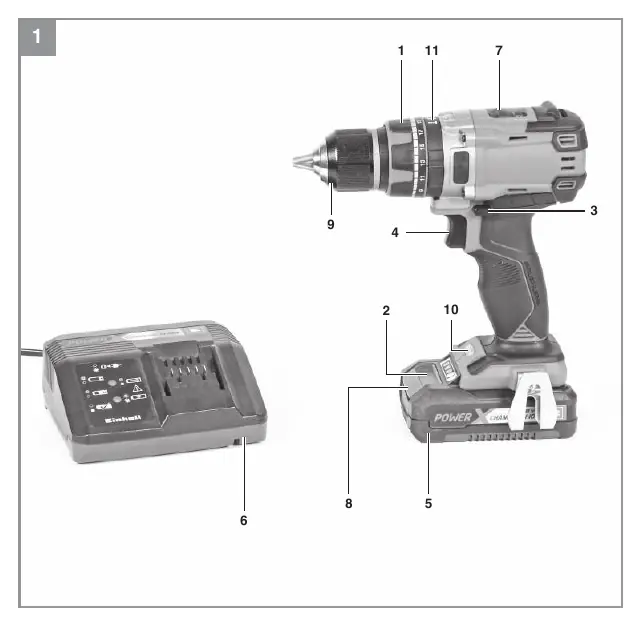
Operation
Charging: Remove the battery pack by pressing the pushlock buttons. Connect the charger to the mains and slide the battery onto the charger. Check the LED indicators on the charger to monitor the status.
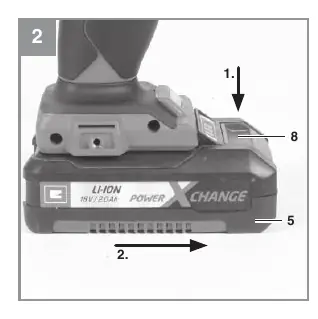
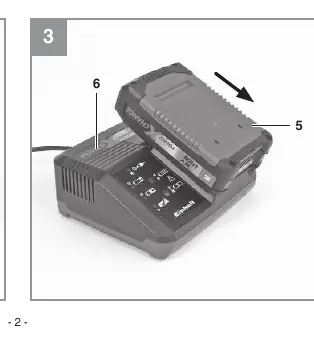
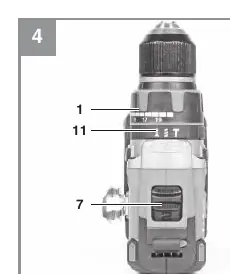
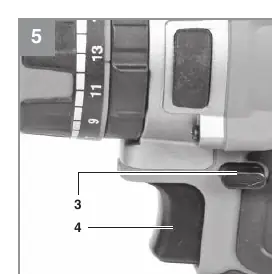
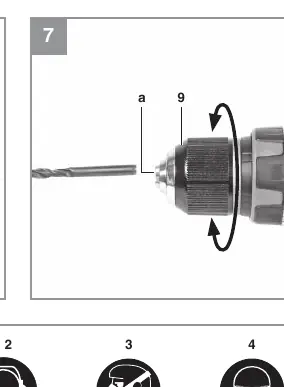
Torque setting: Use the set-collar to adjust the torque for specific screw sizes. Ensure the tool is at a standstill before adjusting.
Gear selection: Use the selector switch to choose between 1st and 2nd gear. Only change gears when the tool is at a standstill.
Cleaning and maintenance
Keep all safety devices, air vents, and the motor housing free of dirt. Clean the device with a clean cloth or blow it with compressed air at low pressure. Do not use cleaning agents or solvents.
Manufacturer information
Einhell
Practical help
Common problems
Check mains voltage, check charger contacts, or contact customer service.
Check battery charge, check rotation switch position.
Before use
- Charge battery
- Check for concealed cables/pipes
- Ensure drill bit is sharp and suitable
- Set rotation direction

Manual page author
Emily Carter
User documentation editor
Prepares concise manual descriptions and highlights the most useful setup, operation, and maintenance information for readers.