User Manual for EIRA 2-in-1 USB-C/A to Dual HD Port Adapter ER2024CU2H
Quick guide for the EIRA 2-in-1 USB-C/A to Dual HD Port Adapter (ER2024CU2H). Learn how to connect, install drivers for macOS, and check compatibility for your devices.
Quick answers from the manual
Quick answer
- The EIRA ER2024CU2H is a 2-in-1 USB-C/A to Dual HDMI adapter. It supports 4K@30Hz and 1080P@60Hz output. It is Plug and Play for Windows/ChromeOS, but requires a driver for macOS. p. 1, 2, 4
Key actions
- Connect the adapter to your computer's USB-C or USB-A port. p. 4
- Install the required driver for macOS to enable dual display. p. 4
First start
- Plug the adapter into the computer, connect HDMI cables, and wait for system recognition. p. 4
Technical specifications
| Parameter | Value | Meaning | Pages |
|---|---|---|---|
| HDMI Resolution | 4K@30Hz, 1080P@60Hz | Supported output resolutions. | p. 2 |
| Operating Voltage | 5V ~ 20V | Power input range. | p. 2 |
Where to find it in the PDF
- Product Overview p. 1
- Technical Specifications p. 2
- Compatibility p. 3
- Installation and Support p. 4
Table of contents
Quick Guide
The EIRA 2-in-1 USB-C/A to Dual HD Port Adapter allows you to extend or mirror your display across multiple monitors. It is designed for business, office, and multitasking environments.
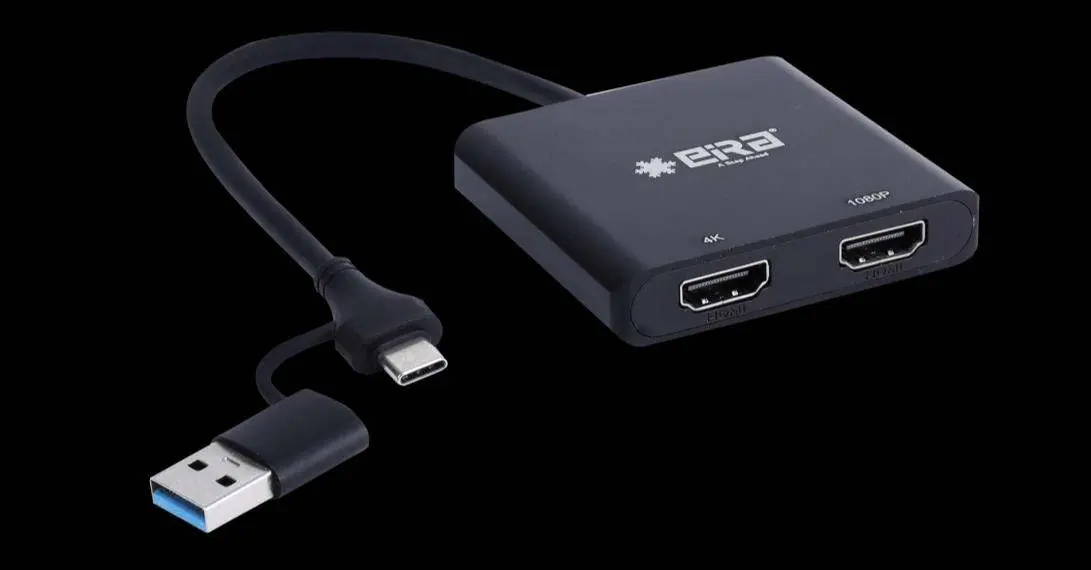
Installation
- Plug the adapter into a USB-C or USB-A port on your computer.
- Connect your HDMI cables from the adapter to your monitors or TVs.
- Wait for the system to recognize the displays.
- Configure your display settings to extend or duplicate the screen as needed.
- For macOS users: Download and install the required driver to enable dual display functionality.
Product Features
- Dual HDMI Output: Supports one 4K@30Hz display and one 1080P@60Hz display.
- Compatibility: Works with Windows, macOS (including M1/M2), and ChromeOS.
- Design: Durable aluminum alloy case for heat dissipation.
- Safety: Built-in protection against over-current, over-voltage, over-heating, and short-circuits.
Technical Specifications
- Input: USB-C / USB-A
- Output: 1x HDMI 4K@30Hz, 1x HDMI 1080P@60Hz
- Power: Bus-powered
- Dimensions: 63 x 56 x 13 mm
- Cable Length: 215 mm
Support
For technical assistance, contact EIRA customer support at +91-8800692207 (Monday to Saturday, 11:00 AM – 5:30 PM) or visit their support portal at eiratek.com/customer-support/.
Official resources from the manual
Practical help
Common problems
Ensure you have downloaded and installed the required driver for macOS.
Ensure the monitor is connected to the correct 4K-supported HDMI port and that the cable supports 4K@30Hz.
Before use
- Verify your computer has a USB-C or USB-A port.
- Ensure you have HDMI cables for your monitors.
- Check if your OS is Windows, macOS, or ChromeOS.
- Confirm your monitor supports the required resolution (4K or 1080P).

Manual page author
Emily Carter
User documentation editor
Prepares concise manual descriptions and highlights the most useful setup, operation, and maintenance information for readers.