Elgato Cold Shoe Mount
Quick start guide for the Elgato Cold Shoe mount. Learn how to adjust the damping, mount your equipment, and understand the load capacity and safety precautions.
Table of contents
Manual images
Click an image to enlargeQuick guide from the manual
This guide provides essential information for setting up and using the Elgato Cold Shoe mount. It covers part identification, damping adjustments, and safety limits to ensure proper operation.
Product components
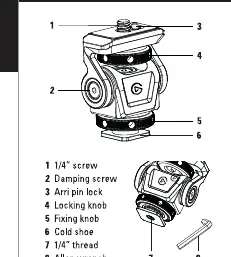
- 1/4 inch screw
- Damping screw
- Arri pin lock
- Locking knob
- Fixing knob
- Cold shoe
- 1/4 inch thread
- Allen wrench
Adjustment and usage
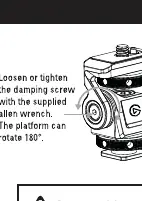
The mount features an adjustable damping system to control the movement of the platform. Use the supplied Allen wrench to loosen or tighten the damping screw as needed. The platform is capable of rotating 180 degrees.
Safety and specifications
Maximum load: 3 kg / 6.6 lbs. Do not exceed this weight limit.
Important: Do not overtighten the knobs or screws to avoid damaging the equipment.
Manufacturer information
Elgato
Practical help
Common problems
Use the supplied Allen wrench to loosen or tighten the damping screw.
Ensure the locking knob and fixing knob are properly tightened, but do not overtighten.
Before use
- Verify the equipment weight does not exceed 3 kg (6.6 lbs).
- Locate the supplied Allen wrench.
- Identify the 1/4 inch screw and thread locations.

Manual page author
David Miller
Documentation analyst
Organizes user manual content into clear summaries, with attention to model details, product context, and everyday usability.