Elgato Wave:1 Microphone User Guide
A quick guide for the Elgato Wave:1 microphone, covering setup, software installation, and control functions.
Quick answers from the manual
Quick answer
- To set up the Elgato Wave:1, connect it to your computer via USB-C and download the Wave Link app from elgato.com/download. p. 1
Key actions
- Push the dial to mute or unmute the microphone. p. 1
- Turn the dial to adjust the monitor volume. p. 1
First start
- Download the Wave Link app and connect the device via USB-C. p. 1
Show 2 more answers Show less
Technical specifications
| Parameter | Value | Meaning | Pages |
|---|---|---|---|
| Power | 5V, 500mA | Power requirements for the device | p. 1 |
Where to find it in the PDF
- User Guide p. 1
Table of contents
Quick Start Guide
To begin using your Elgato Wave:1 microphone, follow these steps:
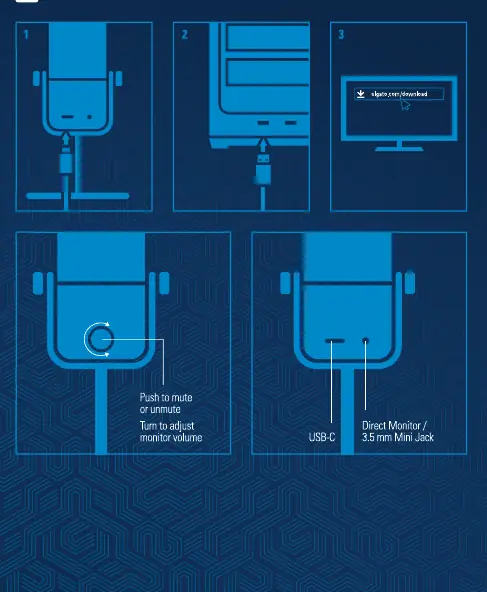
- Download Software: Visit elgato.com/download to download and install the Elgato Wave Link application.
- Connect Device: Connect the microphone to your computer using the provided USB-C cable.
Device Controls
The microphone features a multi-function dial on the front for easy audio management:
- Mute/Unmute: Push the dial to toggle the mute status.
- Adjust Volume: Turn the dial to adjust the monitor volume.
Connections
The device is equipped with the following ports:
- USB-C: Used for data connection and power.
- 3.5 mm Mini Jack: Used for direct monitoring of audio.
Official resources from the manual
Manufacturer information
Elgato
Practical help
Common problems
Microphone not detected or audio not working
Ensure the USB-C cable is securely connected to both the microphone and the computer. Verify that the Elgato Wave Link software is installed.
Before use
- Download the Elgato Wave Link app from elgato.com/download
- Connect the microphone to the computer via USB-C
- Ensure the computer recognizes the device

Manual page author
Michael Turner
Technical manual editor