Elgato Wave:3 Microphone
Quick start guide for the Elgato Wave:3 microphone. Learn how to connect your device, install the Wave Link software, adjust gain and monitor volume, and manage mute settings.
Table of contents
Quick Start Guide
To begin using your Elgato Wave:3, you must first download and install the Elgato Wave Link software. Visit elgato.com/gaming/download to get the latest version for your operating system.
Device Controls
The microphone features a multi-function control dial located on the front. You can interact with it in two ways:
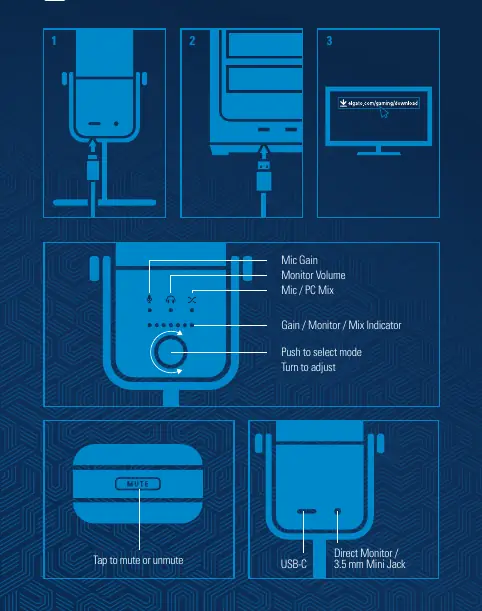
- Push: Press the dial to cycle through the available modes: Mic Gain, Monitor Volume, and Mic/PC Mix.
- Turn: Rotate the dial to adjust the level of the currently selected mode.
The top of the microphone is a touch-sensitive surface. Tap this area to mute or unmute the microphone.
Connections
The rear of the device features the following ports:
- USB-C: Connect the provided USB-C cable here to link the microphone to your computer.
- 3.5 mm Mini Jack: Use this port for direct monitoring with headphones.
Technical Specifications
The device operates with a power rating of 5V, 500mA. Ensure your computer's USB port provides sufficient power for optimal performance.
Official resources from the manual
Manufacturer information
Elgato
Practical help
Common problems
Ensure the USB-C cable is securely connected to both the microphone and your computer. Verify that the Elgato Wave Link software is installed and running.
Press the control dial to cycle through the modes (Mic Gain, Monitor Volume, Mic/PC Mix) until the desired indicator is lit, then turn the dial to adjust.
Before use
- Download the Elgato Wave Link app from the official website
- Connect the USB-C cable to the microphone
- Connect the USB-C cable to your computer
- Ensure the device is selected as the input source in your system settings

Manual page author
Michael Turner
Technical manual editor
Reviews PDF manuals for structure, safety notes, and practical product details so readers can find the right information quickly.