Electronics / Headphones Earbuds
EPOS IMPACT 10xx Headset Quick Start Guide
Quick start guide for the EPOS IMPACT 10xx headset, covering Bluetooth pairing, USB connectivity, call controls, volume adjustment, and charging instructions.
Table of contents
Product Overview
The EPOS IMPACT 10xx is a professional-grade headset designed for clear communication in office and remote work environments. It features intuitive controls for call management, volume adjustment, and microphone muting, ensuring seamless integration into your daily workflow.
Getting Started
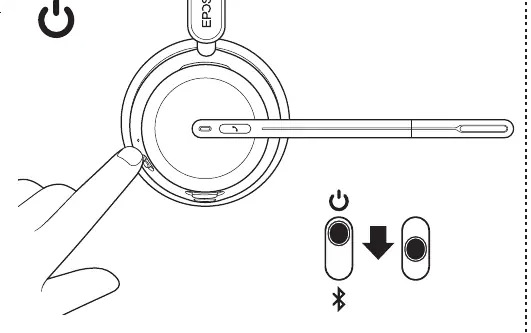
To power on the headset and initiate Bluetooth pairing, slide the power switch to the Bluetooth icon and hold for two seconds. Once in pairing mode, select the EPOS IMPACT 10xx from your device's Bluetooth settings. For computer connectivity, you can use the provided USB dongle to establish a stable wireless connection.
Call and Audio Controls
The headset allows for easy call handling directly from the ear cup. A single press on the designated button answers or ends a call. Volume can be adjusted using the integrated volume rocker. To mute the microphone, you can either rotate the boom arm to the upright position or use the dedicated mute button on the headset.
Software and Updates
For optimal performance and firmware updates, it is recommended to install the EPOS Connect software on your computer. This application allows you to customize settings and ensure your headset is running the latest software version. You can find more information and support at eposaudio.com/impact1000.
Charging
Keep your headset charged by connecting it to a power source via the USB cable. The headset can be charged while connected to a computer or a compatible USB wall charger. Ensure the headset is properly seated in its charging stand if applicable to maintain battery health.
Official resources from the manual
Manufacturer information
EPOS
Practical help
Common problems
Headset not connecting via Bluetooth
Ensure the power switch is held in the Bluetooth position for at least 2 seconds until the pairing mode is active.
Microphone not picking up audio
Check if the boom arm is in the active position and ensure the mute function is not engaged.
Before use
- Charge the headset fully before the first use.
- Install EPOS Connect software on your computer for full functionality.
- Ensure the USB dongle is plugged into a functional USB port if using a PC.
- Verify that the headset is paired with your primary communication device.
Specs in practice
- Bluetooth Pairing
- Wireless connection mode for mobile devices and laptops.
- Boom Arm Mute
- Physical mechanism to mute the microphone by moving the arm.
Images and diagrams
- The power switch has three positions: Off, On, and Bluetooth pairing mode.
- The volume rocker is located on the side of the ear cup for quick adjustments.
- The boom arm can be rotated to toggle the microphone on and off.
Model compatibility
- Compatible with PC via USB dongle.
- Compatible with Bluetooth-enabled mobile devices.

Manual page author
David Miller
Documentation analyst
Organizes user manual content into clear summaries, with attention to model details, product context, and everyday usability.