User Manual for Equip 245521 USB-C PD Charger
Quick installation guide and technical specifications for the Equip 245521 20W GaN Slim USB-C PD Charger. Includes safety instructions, usage steps, and power output details.
Table of contents
Manual images
Click an image to enlargeQuick guide from the manual
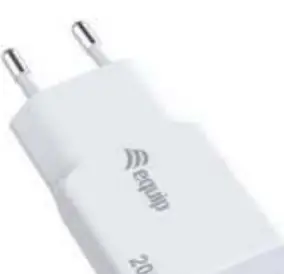
The Equip 245521 is a compact USB-C Power Delivery (PD) charger designed for simple, plug-and-play operation. It is suitable for charging tablets, phones, and other USB-C compatible devices.
Installation
The installation process is straightforward:
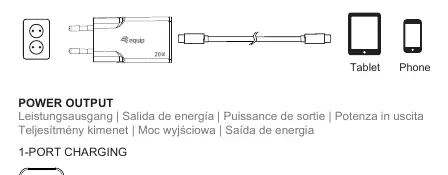
- Plug the charger directly into a standard wall power outlet.
- Connect your device (tablet or phone) to the charger using a compatible USB-C cable.
- The device will begin charging automatically.
Technical Specifications
The charger supports Power Delivery (PD) up to 20W. Key specifications include:
- AC Input: 100.0V ~ 240.0V, 50/60Hz, 0.6A max.
- DC Output: 5.0V/3.0A, 9.0V/2.22A, 12.0V/1.67A (20.0W Max).
- Protection: Short Circuit, Over Current, and Over Voltage protection.
- Dimensions: 44 x 36 x 15mm.
- Weight: 48g.
Safety and Care
To ensure safe operation and longevity of the device, observe the following:
- Keep the device away from water, humidity, fire, and hot environments.
- Do not drop, throw, or crush the device.
- Do not disassemble or open the charger housing.
- Keep out of reach of children and pets.
- Disconnect from the mains before cleaning.
- Clean only with a dry, fibre-free cloth; do not use aggressive chemicals or alcohol.
Manufacturer information
Equip
Practical help
Common problems
Ensure the charger is securely plugged into the wall outlet and the USB-C cable is firmly connected to both the charger and the device.
Disconnect the charger from the power source immediately and inspect for physical damage or debris in the port.
Before use
- Verify the wall outlet provides 100-240V AC power.
- Ensure the USB-C cable is in good condition.
- Check the charger housing for any cracks or physical damage.
- Confirm the device being charged is compatible with USB-C PD standards.

Manual page author
David Miller
Documentation analyst
Organizes user manual content into clear summaries, with attention to model details, product context, and everyday usability.