User Guide for Eterna Metalclad Twin Unswitched RCD Socket TWSRCDMC
Quick guide for the Eterna TWSRCDMC Metalclad Twin Unswitched RCD Socket. Learn about testing procedures, safety indicators, and technical specifications for this 13A unit.
Table of contents
Quick Guide and Safety
The Eterna TWSRCDMC is a metalclad twin unswitched RCD socket designed to provide electrical protection. It is critical to perform a safety test before using the device.
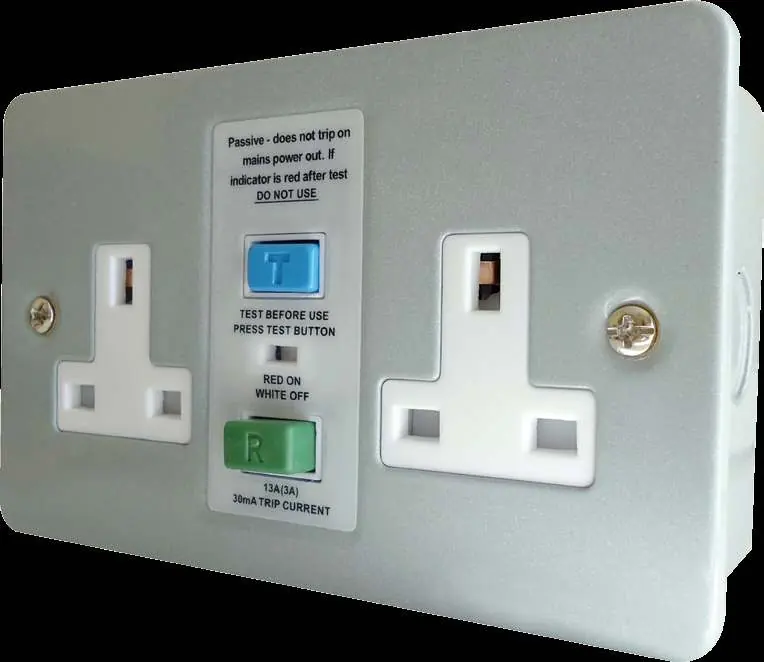
- Test Before Use: Always press the blue 'T' (Test) button before using the socket.
- Safety Warning: If the indicator remains red after pressing the test button, DO NOT USE the socket.
- Indicator Status: The indicator window shows RED when the socket is ON and WHITE when the socket is OFF.
Product Overview
This unit is a twin unswitched AC rated RCD socket featuring a robust pressed steel construction. It is designed for professional and industrial environments where durable, metal-clad electrical accessories are required.
Operation
The device features passive operation. This means it is mechanically latched, so there is no need to manually reset the device after a power loss. It will remain in its set state once power is restored.
Technical Specifications
- Model: TWSRCDMC
- Rated Current: 13 Amp
- Trip Current: 30mA
- Trip Speed: Less than 40mS (typical)
- IP Rating: IP20
- Dimensions: 144mm (width) x 89mm (height) x 43mm (depth)
- Construction: Pressed steel
Manufacturer information
Eterna Lighting
Practical help
Common problems
Do not use the socket. The RCD mechanism may be faulty and requires inspection.
No action is required. The device is passively latched and will maintain its state without needing a manual reset.
Before use
- Ensure the socket is installed correctly.
- Press the blue 'T' (Test) button.
- Verify that the indicator window changes to WHITE (OFF).
- Confirm the indicator does not stay RED.

Manual page author
David Miller
Documentation analyst
Organizes user manual content into clear summaries, with attention to model details, product context, and everyday usability.