Lighting / Fixtures
Eurolamp 12000BTU Portable Air Conditioner User Manual
Quick guide for the Eurolamp 12000BTU portable air conditioner, covering installation, operation, Wi-Fi setup, maintenance, and troubleshooting.
Table of contents
Manual images
Jump to the sectionQuick guide from the manual
This document provides essential instructions for the safe installation and operation of the Eurolamp 12000BTU portable air conditioner. Always read the safety information before connecting the device to power. Keep this manual for future reference.
Device description
The unit features a control panel, remote control receiver, air deflectors, handles, castors, and air intake/outlet grilles. It comes with an exhaust hose, window slider kit, remote control, and drain hose.
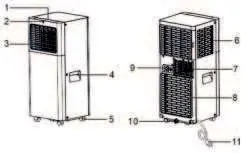
Installation
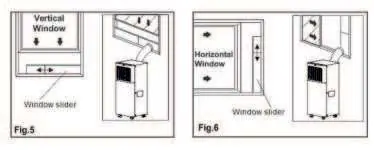
The unit must be placed on a firm, level surface with at least 45 cm (18 inches) of clearance around it. For cooling mode, the exhaust hose must be connected to a window or opening to vent hot air outside. Use the provided window slider kit to secure the hose. Ensure the hose is as short as possible and free of sharp bends or sags.
Operation
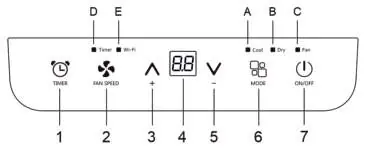
The unit can be operated via the control panel or the remote control. Available modes include Cooling, Fan, and Dehumidification (Dry). You can set the desired temperature, fan speed, and use the timer function to delay start-up or shutdown. The Sleep function is available to gradually reduce operation for night-time comfort.
Wi-Fi setup
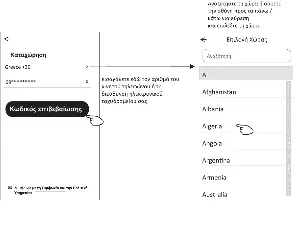
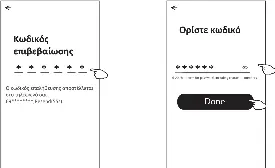
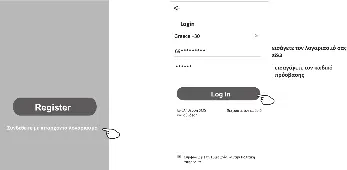
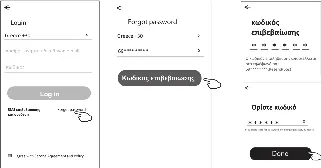
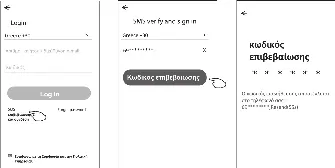
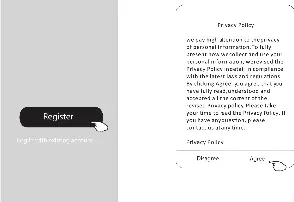
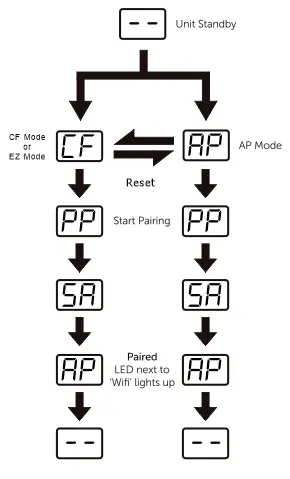
The unit supports Wi-Fi connectivity via the Eurolamp Smart app. Follow the app instructions to register an account, log in, and add the device using either CF or AP mode. Reset the Wi-Fi module if connection fails by using the control panel buttons as described in the manual.
Maintenance and cleaning
Clean the air filter weekly to maintain efficiency. Use a vacuum cleaner or rinse with warm water (max 40°C). Ensure the filter is completely dry before re-installing. Clean the cabinet with a slightly damp cloth; do not use harsh chemicals, wax, or solvents.
Water drainage
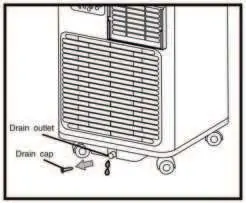
If the internal tank becomes full, the unit will stop and display an error. Drain the water manually by placing a pan under the lower drain plug or continuously by connecting the drain hose to a floor drain or bucket.
Troubleshooting
If the unit does not start, check the power supply and safety device. If cooling is poor, ensure windows and doors are closed and the exhaust hose is properly installed. If the unit displays error codes like PF or FE, refer to the self-diagnosis section for corrective actions.
Manufacturer information
EUROLAMP S.A.
Practical help
Common problems
Unit does not turn on
Check power supply, ensure it is plugged in, and wait 30 minutes if the safety device has tripped.
Unit does not cool the room
Close windows/doors, remove heat sources, and ensure the exhaust hose is properly attached.
Unpleasant smell during operation
Clean the air filter as described in the maintenance section.
Unit stops and displays FE
The internal tank is full; drain the water using the manual or continuous drainage method.
Before use
- Check that the power supply matches the rating plate.
- Ensure the power socket is properly grounded.
- Verify the unit is on a stable, level surface.
- Ensure at least 45 cm of clearance around the unit.
- Check that all accessories are removed from the packaging.
Specs in practice
- Cooling Temperature Range
- 18°C to 32°C (64°F to 90°F) for optimal performance.
- Wi-Fi Frequency
- 2412 MHz - 2472 MHz.
Images and diagrams
- The pairing process diagram shows the transition from standby to CF/AP mode, then to pairing (PP), connected (SA), and finally paired (AP).
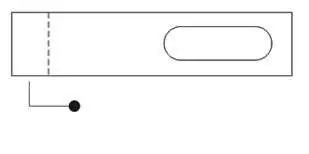
- Installation diagrams show how to extend the hose and attach it to the window slider kit.
Model compatibility
- The unit is for indoor use only.
- Not suitable for very damp rooms like laundries.
- Wi-Fi requires a 2.4 GHz network.

Manual page author
Michael Turner
Technical manual editor
Reviews PDF manuals for structure, safety notes, and practical product details so readers can find the right information quickly.