EvoHeat 150-E Hot Water Heat Pump User Manual
Quick guide for the EvoHeat 150-E hot water heat pump. Includes installation steps, controller operation, modes, troubleshooting, and maintenance instructions.
Table of contents
Manual images
Click an image to enlargeQuick guide from the manual
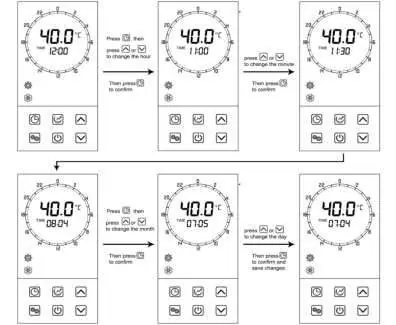
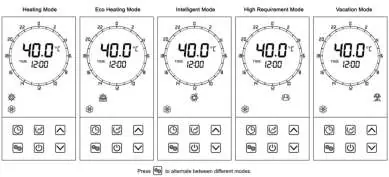
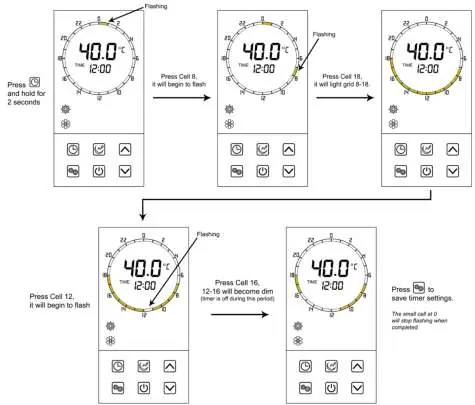
The EvoHeat 150-E is a hot water heat pump designed for energy-efficient water heating. To power on the unit, press and hold the power button for one second. The system features several operating modes, including Eco Heating (default), Heating, Intelligent, High Requirement, and Vacation mode. You can set the time, timers, and target temperatures directly via the controller.
Installation
The unit is designed for external installation. Ensure the base is level and stable. Maintain the following minimum clearances for proper airflow: 300mm on the air inlet side, 500mm on the air outlet side, and 100mm overhead and rear clearance. Do not drill into the outer casing of the tank as this will void the warranty.
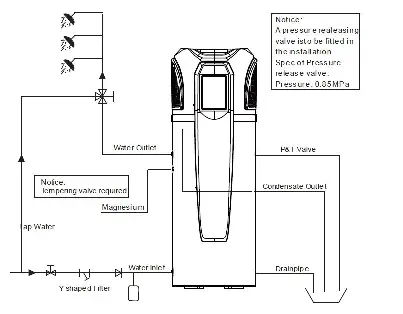
Plumbing and Electrical: A P&T valve must be installed. Use BSP3/4 (internal thread) for water inlet/outlet pipes. The unit requires a 10-amp electrical connection. Ensure all connections are secure and the tank is filled with water before switching the unit on.
Operation
The controller allows you to manage all system functions. Use the UP/DOWN arrows to adjust values and the MODE button to switch between operating modes. The Hydroboost setting (electric heater) can be engaged for high hot water demand. The Sanitech system automatically heats the water to 60°C daily to prevent bacteria growth.
Maintenance
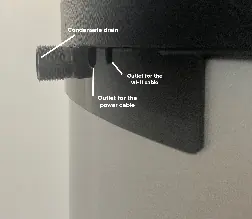
Regular maintenance is essential for efficiency. Perform minor annual maintenance, including visual inspection of plumbing and electrical connections, checking the condensate drain, and cleaning the unit externally. A three-year service is a warranty requirement and must be performed by qualified EvoHeat personnel.
Troubleshooting
If the unit displays an error code, refer to the troubleshooting table. Common issues include sensor failures (P01-P08), pressure protection (E01-E02), and communication failures (E08). For persistent issues, contact EvoHeat service at 1300 859 933.
Appendix
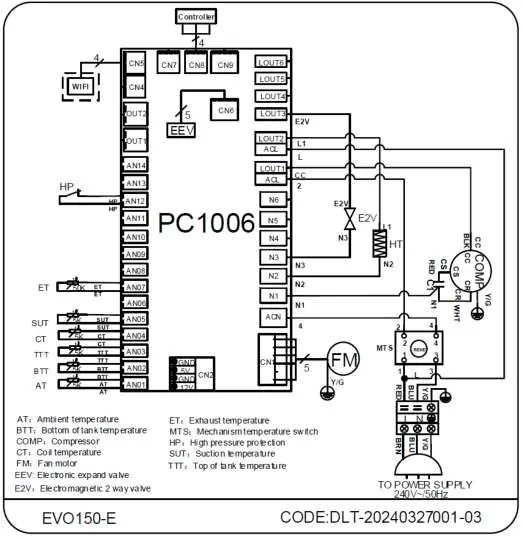
The appendix includes a detailed wiring diagram, instructions for the optional Wi-Fi module connection, P&T valve usage, and manual resetting of the overheating protector. Always ensure the unit is powered off before performing any internal checks or resets.
Practical help
Common problems
Check power supply. Note that if the unit stops, it has a 3-minute protection delay before it can restart.
Check if Hydroboost mode is needed for high demand. Verify the target temperature setting.
Refer to the troubleshooting table in the manual. Most sensor errors require inspection or replacement by a technician.
Use the Force Defrost function by holding the power button for 10 seconds while the unit is off.
Before use
- Check for shipping damage.
- Ensure the installation surface is level and stable.
- Verify P&T valve is installed.
- Check all plumbing and electrical connections.
- Ensure adequate airflow clearances (300mm inlet, 500mm outlet).
- Fill the tank with water before switching on.
Specs in practice
- Storage Capacity
- 150 Liters.
- Power Supply
- 240V/1/50Hz.
- Operating Temp Range
- -5°C to 43°C.
- Noise Rating
- 45 dB(A).
Images and diagrams
- Wiring Diagram: Shows connections for controller, sensors, compressor, and power supply.
- Controller Interface: Displays temperature, time, and mode icons.
Model compatibility
- Requires 10-amp electrical connection.
- Designed for external installation.
- Optional Wi-Fi module available.

Manual page author
Michael Turner
Technical manual editor
Reviews PDF manuals for structure, safety notes, and practical product details so readers can find the right information quickly.