User Manual for Costway FP10269US Portable Air Conditioner
Comprehensive user manual for the Costway FP10269US portable air conditioner. Includes installation instructions, operation modes, WiFi setup, maintenance, and troubleshooting guide.
Table of contents
Manual images
Click an image to enlargeImportant Information
This portable air conditioner uses R32 refrigerant, which is flammable. Always ensure the unit is installed in a well-ventilated room larger than 4m² (43 sq.ft). Do not use the unit near open flames or heat sources. If a leak is suspected, evacuate the area and contact a qualified technician. Always keep the unit upright and allow it to sit for 24 hours before first use if it has been tipped.
Product Overview
The unit features a control panel, air outlet with adjustable louver, air inlet with filter, and an air exhaust. It includes a remote control and window installation kit.
Installation
Unpacking: Ensure all accessories are present, including the exhaust hose, hose connector, window kit adapter, and window kit.
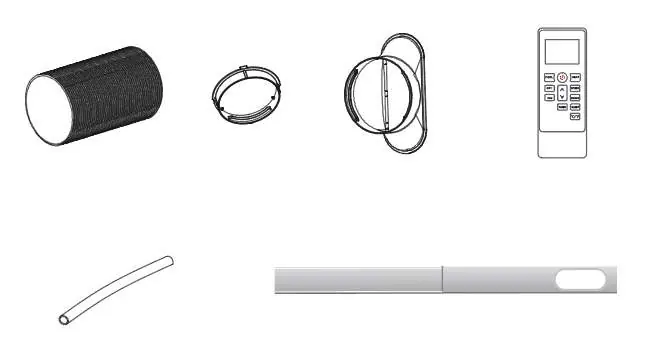

Exhaust Hose Setup: The unit must be ventilated to the outside. Connect the hose connector to one end of the exhaust hose and the window kit adapter to the other. Extend the window kit to fit your window and connect the hose. Ensure the hose is not extended or bent excessively to maintain efficiency.
Location: Place the unit on a flat, stable surface with at least 50cm of free space around it for proper air circulation. Avoid direct sunlight, heat sources, and uneven surfaces.
Operation
Modes: The unit offers Cool, Heat (optional), Dry, Fan, and Sleep modes.
- Cooling: Set temperature between 16°C and 32°C.
- Heating: Set temperature higher than room temperature.
- Dry: Dehumidifies the room. Requires the drain hose to be connected.
- Fan: Circulates air without cooling.
- Sleep: Adjusts temperature automatically for comfort and quiet operation.
Timer: Can be set for 1 to 24 hours for automatic start or stop.
Drainage
Manual Drainage: When the water tank is full, the unit will stop. Place a container under the drain outlet, remove the plug, and allow water to drain.
Continuous Drainage: For drying mode or unattended operation, connect the drain hose to the unit and lead it to a floor drain or bucket.
Cleaning and Care
Clean the air filter every two weeks to maintain efficiency. Remove the filter, vacuum dust, and rinse under running water. Allow it to air dry completely before reinstalling. Do not touch the evaporator surface with bare hands.

Troubleshooting
If the unit is not operating, check the power connection, ensure the water tank is not full, and verify the room temperature is within the operating range (5-35°C). Error codes like E0, E1, E2, or Ft indicate specific faults such as sensor failures or high water levels.
WiFi Connection
The unit supports app control via the Smart Life app. Activate WiFi on the unit, ensure your phone is connected to a 2.4GHz network, and follow the in-app instructions to add the device.
Official resources from the manual
Practical help
Common problems
Check power connection, empty the drain pan if the water level indicator is on, and ensure room temperature is within 5-35°C.
Clean the air filter, clear any obstructions in the air duct, close doors and windows, and ensure the exhaust hose is securely attached.
Empty the water tank before moving the unit and ensure the drain hose is straight and not kinked.
Ensure the unit is positioned on a firm, level surface and check for any loose or vibrating parts.
Before use
- Place the unit on a flat, stable surface.
- Ensure at least 50cm of free space around the unit.
- Verify the room size is at least 4m².
- If the unit was tipped more than 45°, let it stand upright for 24 hours.
- Ensure the exhaust hose is properly installed and not blocked.
Specs in practice
- R32 Refrigerant
- Environmentally friendly but flammable; requires professional handling.
- Cooling Mode
- Lowers room temperature; adjustable between 16°C and 32°C.
Images and diagrams
- Control panel and display indicators
- Exhaust hose assembly steps
- Drainage port location
- Air filter removal and cleaning
Model compatibility
- Requires 2.4GHz WiFi network for app connectivity.
- Not suitable for rooms smaller than 4m².

Manual page author
David Miller
Documentation analyst
Organizes user manual content into clear summaries, with attention to model details, product context, and everyday usability.