User Manual for Fantech Studio Pro WH003 Wireless Headset
Quick guide for the Fantech Studio Pro WH003 wireless headset. Learn how to connect via 2.4G, Bluetooth, or wired modes, use the software, and manage controls.
Table of contents
Manual images
Click an image to enlargeQuick guide from the manual
This document provides essential instructions for operating the Fantech Studio Pro WH003 wireless headset. It covers connection methods, software configuration, and basic maintenance to ensure optimal performance.
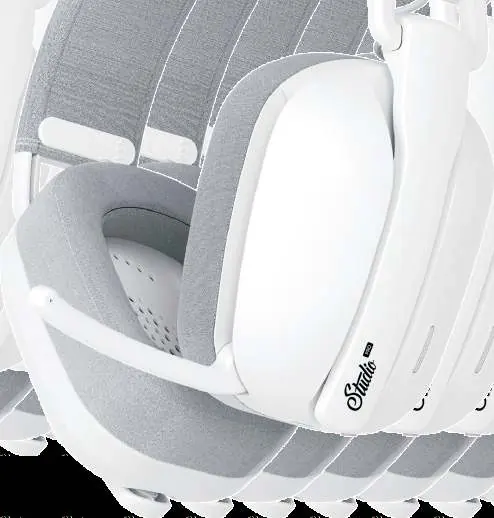
Package Contents
- Studio Pro WH003 Headset
- USB Receiver
- 3.5mm Audio Cable
- USB-C to USB-A Cable
- Pouch
- User Manual
Controls and Overview
The headset features physical controls for easy adjustment:
- Power Button: Hold for 3 seconds to power on or off.
- Volume Wheel: Rotate to adjust volume.
- Mic Mute: Double-press the power button to mute or unmute the microphone.
- Mode Switch: Slide to select between 2.4G, Bluetooth, or Wired mode.
Connection Modes
2.4G Wireless
- Plug the 2.4G dongle into your device.
- Slide the mode switch on the headset to the 2.4G position.
- The headset will connect automatically.
Bluetooth
- Slide the mode switch to the BT position.
- Open your device's Bluetooth settings and search for "Studio Pro WH003".
- Select the device to pair.
Wired Mode
- USB-C: Connect the headset to your device using the USB-C cable.
- 3.5mm: Connect the headset to your device using the 3.5mm cable.
Software and Settings
Download the official software to access advanced features:
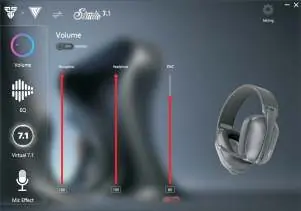
- EQ: Customize audio profiles or use presets.
- 7.1 Virtual Surround: Enable or disable virtual surround sound.
- Mic Effect: Adjust microphone settings, including voice changers and noise cancellation.
Reset Connection
If the headset fails to connect, perform a reset:
- Unplug the 2.4G dongle.
- Slide the mode switch to the 2.4G side.
- Hold the power button for 9 seconds until the headset turns off and on again.
- The headset will enter pairing mode.
Technical Specifications
- Connection: 2.4G, Wireless, 3.5mm, USB-C
- Driver Diameter: 50mm
- Frequency Response: 15-30000Hz
- Wireless Range: Up to 10 meters
- Battery Life: Approximately 40 hours
- Weight: 180g
Important Safety Notes
- Charge the headset fully before the first use.
- Charge the headset every 3 months if not in use for a long period.
- Do not disassemble or modify the headset.
- Keep away from fire and high-temperature environments.
Manufacturer information
Fantech
Practical help
Common problems
Try plugging the 2.4G dongle into a different USB port.
Perform a reset by holding the power button for 9 seconds while in 2.4G mode.
Ensure the mode switch is set correctly and the cable is fully inserted.
Before use
- Charge the headset fully before the first use.
- Ensure the 2.4G dongle is connected for wireless use.
- Download the software for full feature access.
- Check that the mode switch is set to the desired connection type.
Specs in practice
- Battery Life
- Approximately 40 hours of usage on a full charge.
- Wireless Range
- Up to 10 meters from the connected device.
- Frequency Response
- 15Hz to 30000Hz, covering a wide range of audio frequencies.
Images and diagrams
- The overview diagram identifies the power button, volume wheel, and mode switch locations.
- Software screenshots illustrate the interface for EQ, 7.1 Surround, and Mic Effects.
Model compatibility
- Compatible with PC, mobile devices, and consoles.

Manual page author
Emily Carter
User documentation editor
Prepares concise manual descriptions and highlights the most useful setup, operation, and maintenance information for readers.