Electronics / Speakers & Soundbars
User Manual for FBT 1020SA Active Subwoofer
Quick guide for the FBT 1020SA Active Subwoofer. Includes setup instructions, connection diagrams, control explanations, and technical specifications.
Table of contents
Manual images
Click an image to enlargeQuick guide from the manual
To ensure proper operation and avoid damage to the equipment or hearing, follow these steps:
- Before connecting: Ensure the mains voltage matches the unit (100-240Vac) and set all volume controls to minimum.
- Powering on: Always turn on the sound source first, then the subwoofer.
- Powering off: Turn off the subwoofer first, then the sound source.
- Auto Standby: The unit enters low consumption mode after approximately 7 minutes of inactivity (PWR LED turns red).
Safety precautions
- Ensure proper ventilation by leaving at least 11 inches of clearance on all sides.
- Do not cover ventilation slots or place naked flames (e.g., candles) on the device.
- Keep away from water sources and do not place objects containing liquids on the unit.
- Connect only to a power outlet with a protective earth connection.
- Do not open the cover; no user-serviceable parts are inside.
Power supply
The FBT 1020SA is designed to operate with universal mains voltage (100-240Vac / 50-60Hz). The power socket includes a fuse box. If a fuse needs replacement, use only a fuse with the same electrical features and value to avoid damaging the device. Always disconnect the power cable before replacing the fuse.
Controls and functions
The control panel allows for precise sound adjustment:

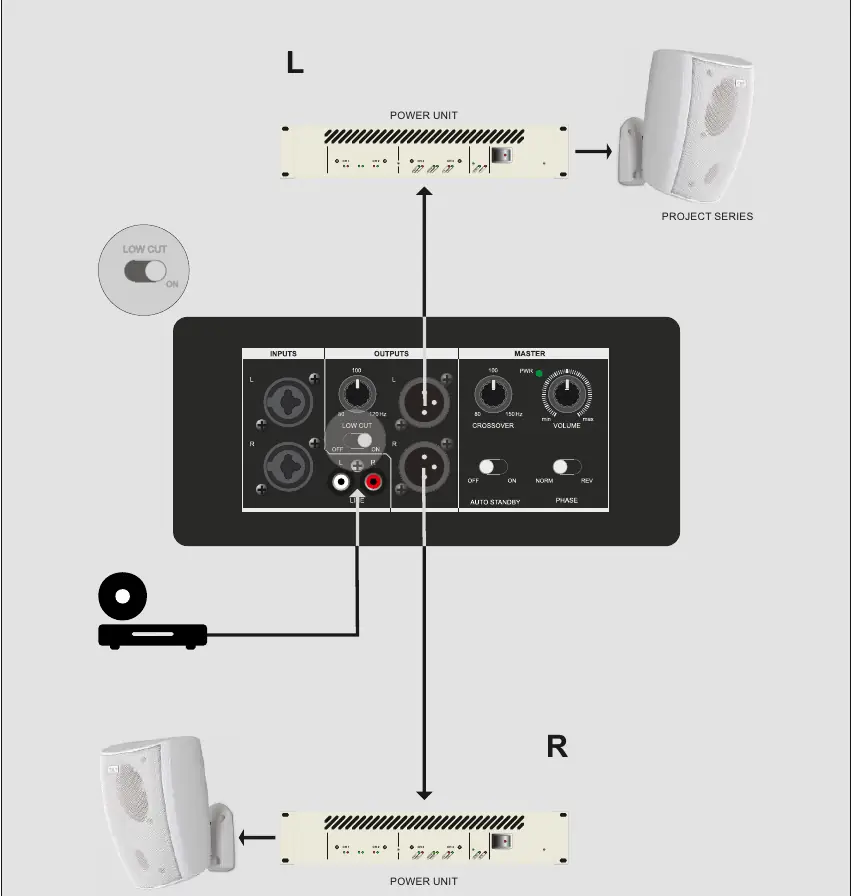
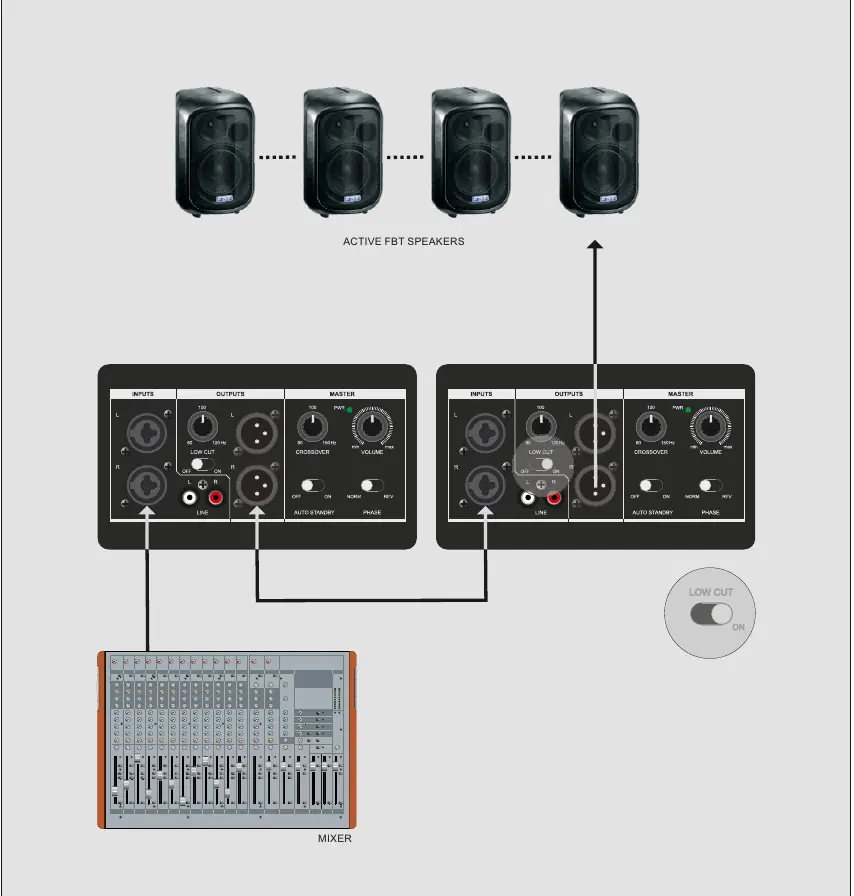
- Inputs: Includes stereo XLR inputs for balanced line-level sources and RCA inputs for unbalanced line-level sources.
- Outputs: Balanced XLR stereo outputs for connecting other subwoofers or satellites. Use the LOW CUT switch (ON position) if satellites require a hi-pass filter.
- Master Section: Includes the PWR LED, VOLUME control, and CROSSOVER frequency adjustment (80-150Hz).
- Phase Switch: Allows 180-degree phase reversal to correct alignment with connected satellites.
Connection cables
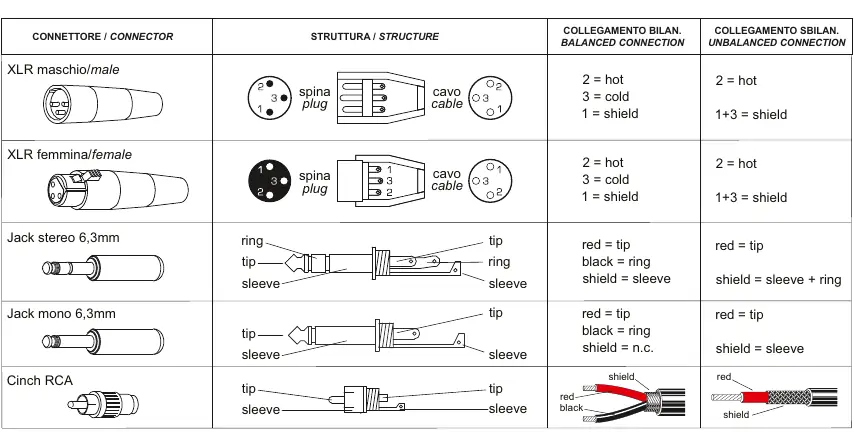
The system supports various balanced and unbalanced connections. Use high-grade cables to avoid noise. The manual provides specific wiring diagrams for XLR (male/female), 6.3mm stereo/mono jacks, and Cinch RCA connectors.
Technical specifications
- Type: 10" active studio monitor subwoofer
- Power Output: 150 W RMS
- Frequency Response: 40 - 150 Hz
- Impedance: 4 Ohm
- Input Impedance: 10 kOhm balanced / 20 kOhm unbalanced
- Dimensions: 330 x 367.5 x 365 mm
- Weight: 16 kg
Manufacturer information
FBT Elettronica SpA
Practical help
Common problems
No sound output
Check power connection, ensure volume is turned up, and verify input signal source.
Annoying 'bump' noise when turning on
Always turn on the sound source first, then the subwoofer. Turn off the subwoofer first when shutting down.
Unit enters standby mode unexpectedly
The unit enters auto-standby after 7 minutes of inactivity. Ensure the input signal is active.
Before use
- Verify mains voltage matches the unit (100-240Vac).
- Set all volume controls to minimum before connecting.
- Ensure at least 11 inches of clearance for ventilation.
- Use high-grade cables for all audio connections.
- Ensure the power outlet has a protective earth connection.
Specs in practice
- Power Output
- 150 W RMS continuous power.
- Input Impedance
- 10 kOhm for balanced inputs, 20 kOhm for unbalanced inputs.
Images and diagrams
- Wiring diagrams show pin configurations for XLR, Jack, and RCA cables.
- Connection examples illustrate how to integrate the subwoofer with satellites and mixers.
Model compatibility
- Compatible with balanced (XLR) and unbalanced (RCA) line-level audio sources.
- Designed for 100-240Vac / 50-60Hz universal mains voltage.

Manual page author
Emily Carter
User documentation editor
Prepares concise manual descriptions and highlights the most useful setup, operation, and maintenance information for readers.