User Manual for Focal 100-T Series Loudspeakers
Quick start guide for Focal 100-T Series ceiling and wall loudspeakers. Includes installation steps, wiring diagrams for 100V/70V systems, and power setting instructions for models 100 ICW5-T, 100 ICW6-T, and 100 ICW8-T.
Table of contents
Quick guide from the manual
This document provides essential installation and setup instructions for the Focal 100-T Series loudspeakers, including models 100 ICW5-T, 100 ICW6-T, and 100 ICW8-T. These speakers are designed for 100V/70V public address systems.
Installation
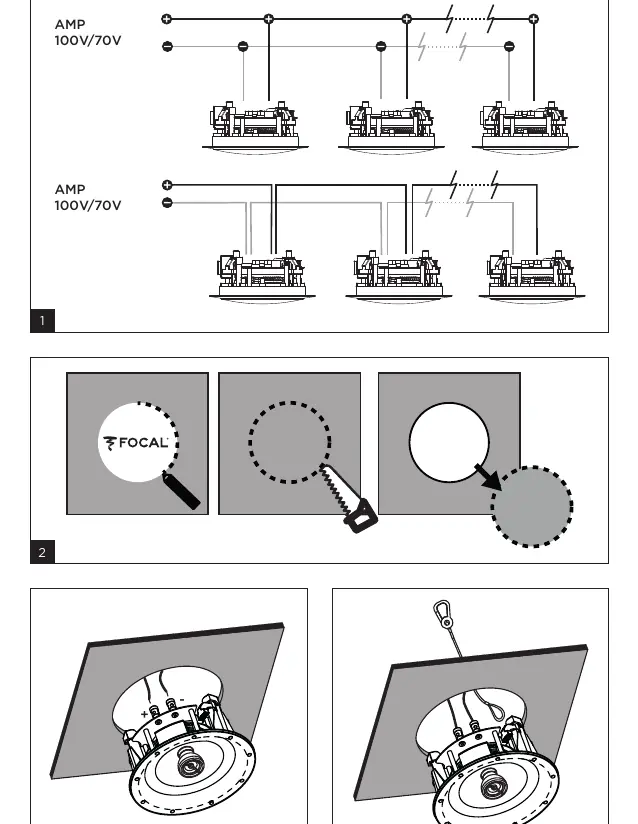
- Preparation: Use the provided template to cut the appropriate hole in the ceiling or wall.
- Wiring: Connect the speakers to your 100V/70V amplifier. Ensure correct polarity (+/-) as shown in the wiring diagram.
- Mounting: Insert the speaker into the opening and secure it using the integrated mounting screws.
- Safety: Attach the safety cable to the speaker to prevent accidental falls.
Settings and Adjustments
Power Settings: Adjust the power tap selector switch on the speaker to match your system requirements (refer to the power table for specific wattage settings for each model).
Tweeter Adjustment: For ICW6-T and ICW8-T models, you can adjust the angle of the tweeter to direct sound as needed.
Finishing
Once the speaker is securely mounted and settings are configured, attach the grille to the speaker to complete the installation.
Manufacturer information
Focal
Practical help
Common problems
Check the amplifier connection and ensure the power tap setting on the speaker is correctly configured.
Verify that the power tap setting (W) on the speaker matches the amplifier output requirements.
Before use
- Verify amplifier compatibility (100V/70V system)
- Check mounting surface thickness
- Ensure correct wiring polarity (+/-)
- Set power tap before final installation
- Attach safety cable

Manual page author
Emily Carter
User documentation editor
Prepares concise manual descriptions and highlights the most useful setup, operation, and maintenance information for readers.