Electronics / Cameras
FUJIFILM XF16-55mmF2.8 R LM WR II Lens Owner's Manual
Comprehensive owner's manual for the FUJIFILM XF16-55mmF2.8 R LM WR II lens, covering safety instructions, product care, installation, operation, and technical specifications.
Table of contents
Product Description
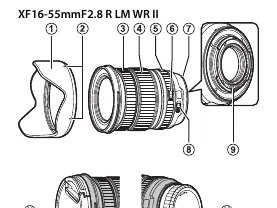
The FUJIFILM XF16-55mmF2.8 R LM WR II is a high-performance lens designed exclusively for the FUJIFILM X mount. It features a constant F2.8 aperture, linear motor autofocus for fast and accurate performance, and a weather-resistant (WR) construction to ensure reliability in various shooting conditions.
Safety Precautions
Warning: Failure to observe these precautions can result in fire, electric shock, or injury. Do not immerse the lens in water or expose it to moisture. Do not disassemble the lens. If the lens casing breaks due to a fall or accident, do not touch the exposed internal parts; remove the camera battery and consult your dealer.
Caution: Keep out of reach of small children. Do not handle with wet hands. When shooting backlit subjects, keep the sun out of the frame to prevent sunlight from focusing inside the camera, which can cause fire or burns. When not in use, attach lens caps and store away from direct sunlight.
Getting Started
Ensure your camera and lens firmware are updated to the latest versions for optimal performance. Firmware updates can be found on the official Fujifilm support website. To attach the lens, refer to your camera's owner's manual. This lens is not compatible with G mount or X mount film cameras.
Operation
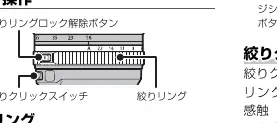
- Aperture Ring: Rotate to select the aperture (f-number). Set to 'A' for automatic aperture selection by the camera. Press the aperture ring lock release to switch between 'A' and manual settings.
- Aperture Click Switch: Slide to 'OFF' to silence the clicking sound and allow for smoother aperture ring rotation.
- Zoom: Rotate the zoom ring to adjust the focal length. Rotate left to zoom out and right to zoom in.
Maintenance
Keep lens signal contacts clean. Use a blower to remove dust and lint from glass surfaces. To remove smudges or fingerprints, apply a small amount of lens cleaner to a soft, clean cloth and clean in a circular motion from the center outwards. Never use organic solvents like paint thinner or benzene. Store in a cool, dry place to prevent mold and rust.
Disposal
This product should not be treated as household waste. Please dispose of it at an appropriate collection point for the recycling of electrical and electronic equipment to help conserve natural resources and prevent negative environmental impacts.
Related manuals
Related manuals from the same brand or category.

Manual page author
Emily Carter
User documentation editor
Prepares concise manual descriptions and highlights the most useful setup, operation, and maintenance information for readers.