Power / Batteries Chargers
Gadnic 15000mAh Power Bank User Manual
Comprehensive user guide for the Gadnic 15000mAh Power Bank, covering setup, charging instructions, safety precautions, and troubleshooting.
Table of contents
Product Overview
The Gadnic 15000mAh Power Bank is a high-precision electronic device designed to provide portable power for various mobile devices, including smartphones, tablets, MP3/MP4 players, and handheld gaming consoles. It features intelligent power management and an LED display to indicate current charge levels.
Technical Specifications
- Capacity: 15000mAh
- Input (DC): 5V, 1.0A - 2.1A
- Output (DC): 5V, 1.0A - 2.1A
Safety Precautions
To ensure safe operation and longevity of your device, please adhere to the following guidelines:
- Use only official chargers that meet the specified technical requirements.
- Do not disassemble, alter, or subject the device to physical impact.
- Avoid environments with extreme temperatures, high humidity, dust, or direct sunlight.
- Keep the device away from water, liquids, and moisture.
- Operate within an altitude of 3000 meters and a temperature range of 0°C to 35°C.
- Follow local environmental regulations for proper disposal of the device and its accessories.
Operation and Charging
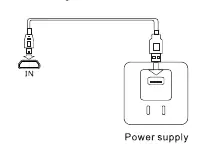
Charging the Power Bank: Connect the power bank to a power source using the provided USB-Micro USB cable. Ensure the charger or computer is powered on. The charging process will start automatically.
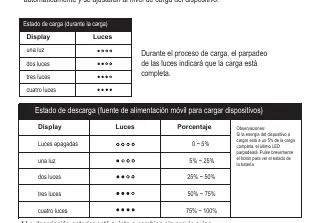
Charging Other Devices: Connect your mobile device to the power bank's USB output port using a compatible data cable. The power bank will automatically detect the device and begin charging. It will automatically power off 30 seconds after the device is disconnected.
LED Indicators: The LED display shows the remaining battery percentage. During charging, the blinking lights indicate the progress. To check the battery level, press the power button briefly.
Maintenance and Storage
If the power bank will not be used for an extended period, store it in a dry environment between 5°C and 35°C, away from direct sunlight. If unused for more than three weeks, charge and discharge the unit at least once a month to maintain battery health.
Troubleshooting
If you encounter issues, check the following:
- Indicator not turning on: Ensure you are using a compatible charger and that the data cable is functional.
- Device not charging: Verify the USB connection and ensure the data cable is not damaged.
- Power bank not turning on: The battery may be depleted; please recharge the unit.
- Overheating: If the device overheats, stop using it immediately and contact technical support.
Related manuals
Related manuals from the same brand or category.