Automotive / Navigation
Garmin TT 15X / TT 15 Mini Dog Collar Device
Quick start guide for the Garmin TT 15X and TT 15 Mini dog collar devices, covering setup, charging, pairing, fitting, and maintenance.
Table of contents
Product Overview
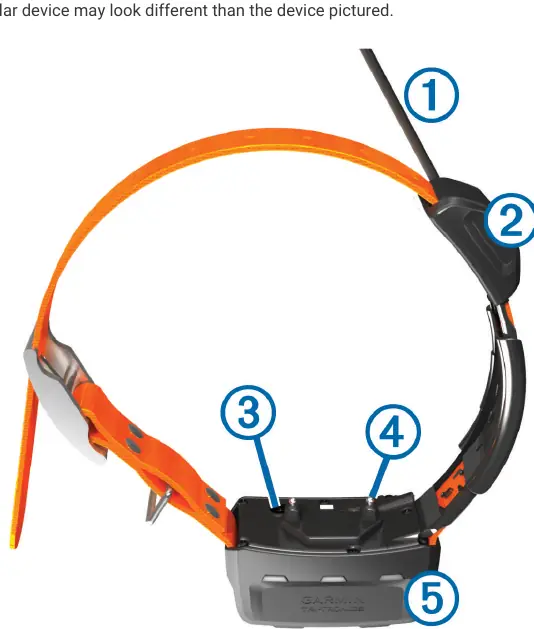
The Garmin TT 15X and TT 15 Mini are advanced dog collar devices designed for tracking and training. These devices feature a VHF antenna for communication, a GPS antenna for location tracking, a power button, contact points for training stimulation, and status/beacon LEDs for visibility.
Getting Started
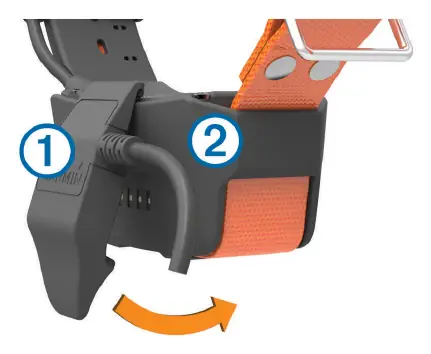
Before using the device for the first time, ensure the battery is fully charged. Charging a depleted battery takes approximately five hours. To charge, snap the charging clip onto the device, connect the power cable to the clip, and plug it into a power source. The status LED will glow solid red while charging and turn solid green when complete.
Fitting the Collar
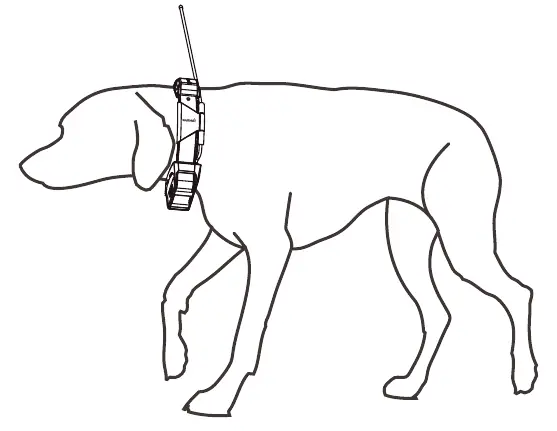
Proper fit is essential for effective training and tracking. Position the device at the front of the dog's neck with the status LED facing the chin and contact points against the throat. Tighten the strap so it is snug but allows the dog to swallow food and water normally. Ensure the contact points touch the dog's skin. If the strap is too long, trim the excess, leaving at least 8 cm (3 inches) to spare.
Pairing and Operation
To add a dog to your compatible Alpha handheld device, turn off the collar, then hold the power button until the device emits two series of beeps. The status LED will flash rapidly in green, indicating it is ready for pairing. On your handheld device, select Dog List > Add Dog and follow the on-screen instructions.
Safety and Maintenance
- Skin Irritation: To prevent irritation, remove the collar for at least eight hours out of every 24-hour period.
- Chemicals: Do not spray the device or collar with harsh chemicals, such as flea or tick sprays. Ensure any applied sprays are completely dry before putting the collar on the dog.
- Antenna Care: For optimal performance, keep the antenna pointed straight up. Use the provided cable ties to secure the antenna and antenna keeper to the collar. Ensure no sharp edges from cable ties touch the dog's skin.
- Software Updates: Connect the device to a computer and use the Garmin web updater to keep the software current.
Troubleshooting and Disposal
If the device fails to charge, ensure the contacts are clean and dry. For long-term storage, charge the battery to approximately 50% and store in a cool, dry place. Dispose of the device and batteries according to local waste regulations.
Related manuals
Related manuals from the same brand or category.
General / Other Manuals
12-Week Sprint Triathlon Training Programme - Intermediate
Garmin
Manual page author
Michael Turner
Technical manual editor
Reviews PDF manuals for structure, safety notes, and practical product details so readers can find the right information quickly.