User Manual for Globo Lighting 12379A LED Ceiling Light
Quick guide for the Globo Lighting 12379A LED ceiling light. Learn how to operate the touch dimmer, charge the battery, and understand the non-replaceable light source specifications.
Table of contents
Manual images
Click an image to enlargeImportant Information
This document provides operating instructions for the Globo Lighting 12379A LED ceiling light. The device features a built-in rechargeable battery and touch-sensitive controls. Please note that the LED light source is permanently integrated and cannot be replaced.
Product Overview
The 12379A is a rechargeable LED light designed for indoor use. It includes a magnetic mounting option and is powered by a 3.7V Li-ion 18650 1800mAh battery.
Operation
The light is operated via a touch-sensitive sensor:
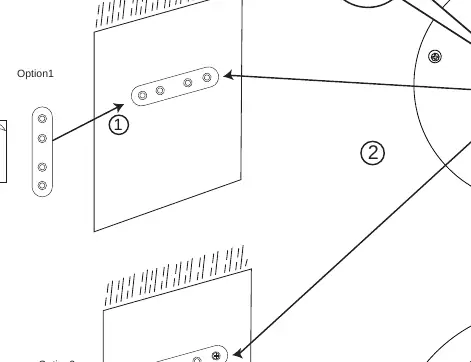
- On/Off & Dimming: Tap the touch sensor to turn the light on. Repeatedly tap the sensor to cycle through brightness levels: 100% brightness -> 40% brightness -> 10% brightness -> OFF.
Charging
To charge the device:
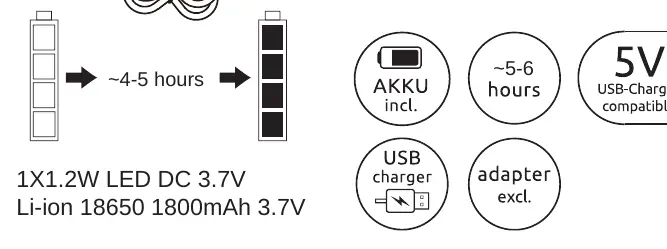
- Connect the light to a power source using the provided USB cable.
- A standard USB adapter (not included) is required.
- The charging time is approximately 4-5 hours.
- The operating time on a full charge is approximately 5-6 hours.
Safety and Maintenance
- The LED light source is non-replaceable. Do not attempt to open or modify the unit.
- Ensure the device is kept dry.
- The device is compatible with standard 5V USB chargers.
Manufacturer information
Globo Lighting
Practical help
Common problems
Ensure the battery is fully charged. Connect the device to a USB power source for 4-5 hours.
Ensure the touch sensor area is clean, dry, and free of debris or moisture.
Before use
- Charge the device fully before the first use (~4-5 hours).
- Verify you have a compatible 5V USB adapter (not included).
- Ensure the mounting surface is suitable for the magnetic attachment.
- Check that the touch sensor area is clean.

Manual page author
David Miller
Documentation analyst
Organizes user manual content into clear summaries, with attention to model details, product context, and everyday usability.