Installation Guide for Globo Lighting 15767-4H Pendant Lamp
Step-by-step installation guide for the Globo Lighting 15767-4H pendant lamp. Includes instructions for mounting, wiring, and bulb installation.
Quick answers from the manual
Quick answer
- This document provides installation instructions for the Globo Lighting 15767-4H pendant lamp, including mounting, wiring, and bulb installation. p. 1
Key actions
- Turn off power at the circuit breaker before installation. p. 1
First start
- After installation, turn on the power at the circuit breaker. p. 1
Show 2 more answers Show less
Technical specifications
| Parameter | Value | Meaning | Pages |
|---|---|---|---|
| Bulb Type | LED | Use only LED bulbs | p. 1 |
Where to find it in the PDF
- Installation Instructions p. 1
Table of contents
Quick guide from the manual
This document provides the installation procedure for the Globo Lighting 15767-4H pendant lamp. Always ensure the power is disconnected at the circuit breaker before beginning any electrical work.
Installation steps
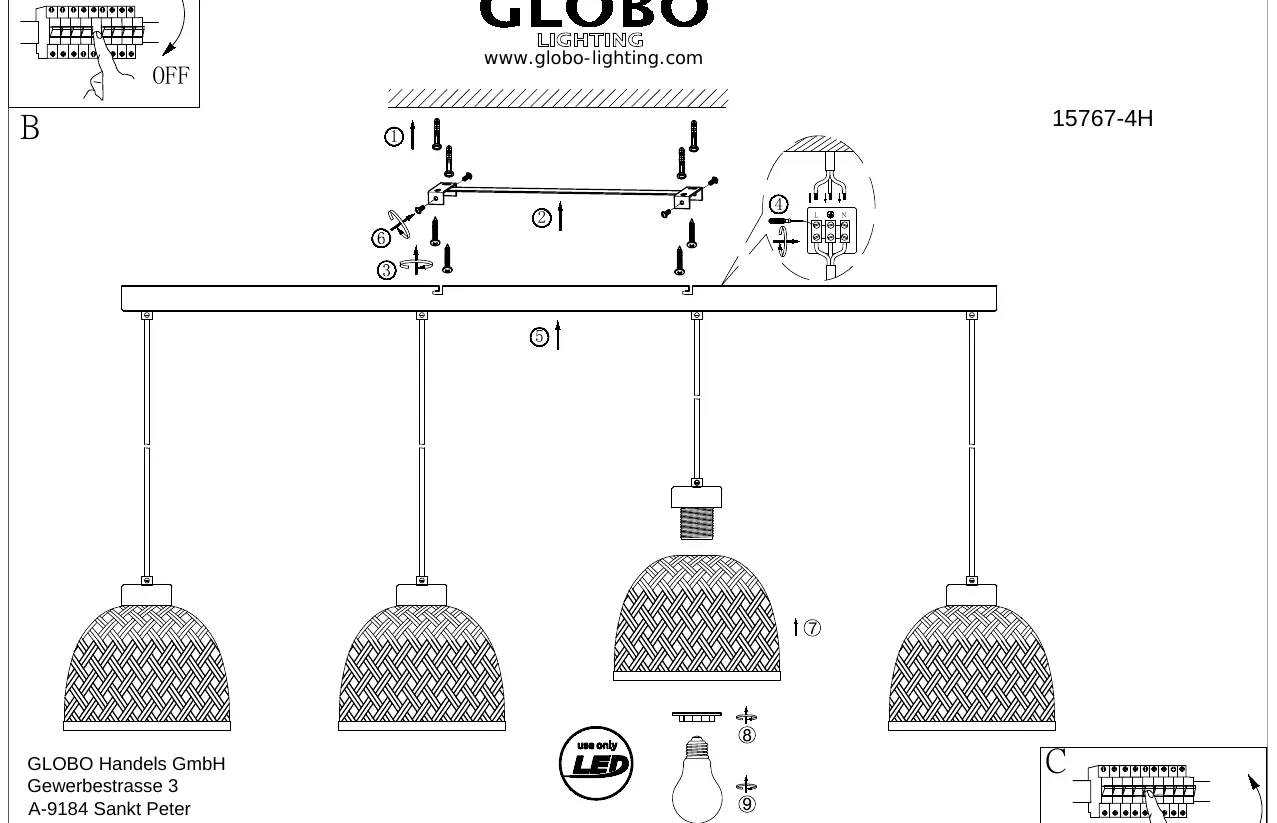
- Preparation: Turn off the power supply at the main circuit breaker.
- Mounting: Secure the mounting bracket to the ceiling using the provided screws.
- Wiring: Connect the electrical wires to the terminal block, ensuring proper connection of Live (L) and Neutral (N) wires.
- Assembly: Attach the main lamp fixture to the mounting bracket and secure it.
- Finishing: Install the shades and the LED bulbs.
- Completion: Turn the power back on at the circuit breaker.
Important usage notes
Use only LED: This fixture is designed exclusively for use with LED bulbs. Do not use other types of bulbs.
Manufacturer information
Globo Lighting
Practical help
Common problems
Light does not turn on
Check if the power is turned on at the circuit breaker and ensure wiring connections are secure.
Before use
- Ensure power is turned off at the main circuit breaker before starting installation.
- Verify you have all necessary tools for mounting.
- Check that the ceiling can support the weight of the lamp.

Manual page author
Michael Turner
Technical manual editor