User Manual for Globo Lighting 21006 Series Table Lamp
Quick guide for the Globo Lighting 21006 series table lamp. Learn how to operate the touch controls, adjust color temperature, dim the light, and charge the battery.
Quick answers from the manual
Quick answer
- The Globo Lighting 21006 series lamp is operated via touch controls. A short press cycles through color temperatures (2700K, 6500K, 4000K) and turns the light off. A long press activates the continuous dimmer. p. 1
Key actions
- Charge the lamp using a 5V USB charger for 6-8 hours. p. 1
First start
- Charge the battery fully before initial use. p. 1
Problems and fixes
Check battery charge level and ensure the USB charger is 5V.
p. 1Maintenance and reset
- The light source is non-replaceable and integrated into the product. p. 2, 3
Technical specifications
| Parameter | Value | Meaning | Pages |
|---|---|---|---|
| Battery | 3.7V 1800mAh Li-ion | Rechargeable battery included | p. 1 |
| Power | Max 2.5W | Maximum power consumption | p. 1 |
Where to find it in the PDF
- Operation and Charging p. 1
- Light Source Disclaimer p. 2, 3
Table of contents
Quick guide from the manual
The Globo Lighting 21006 series table lamp is a portable LED light featuring touch-sensitive controls and an integrated rechargeable battery. This document provides instructions for operation, charging, and maintenance.
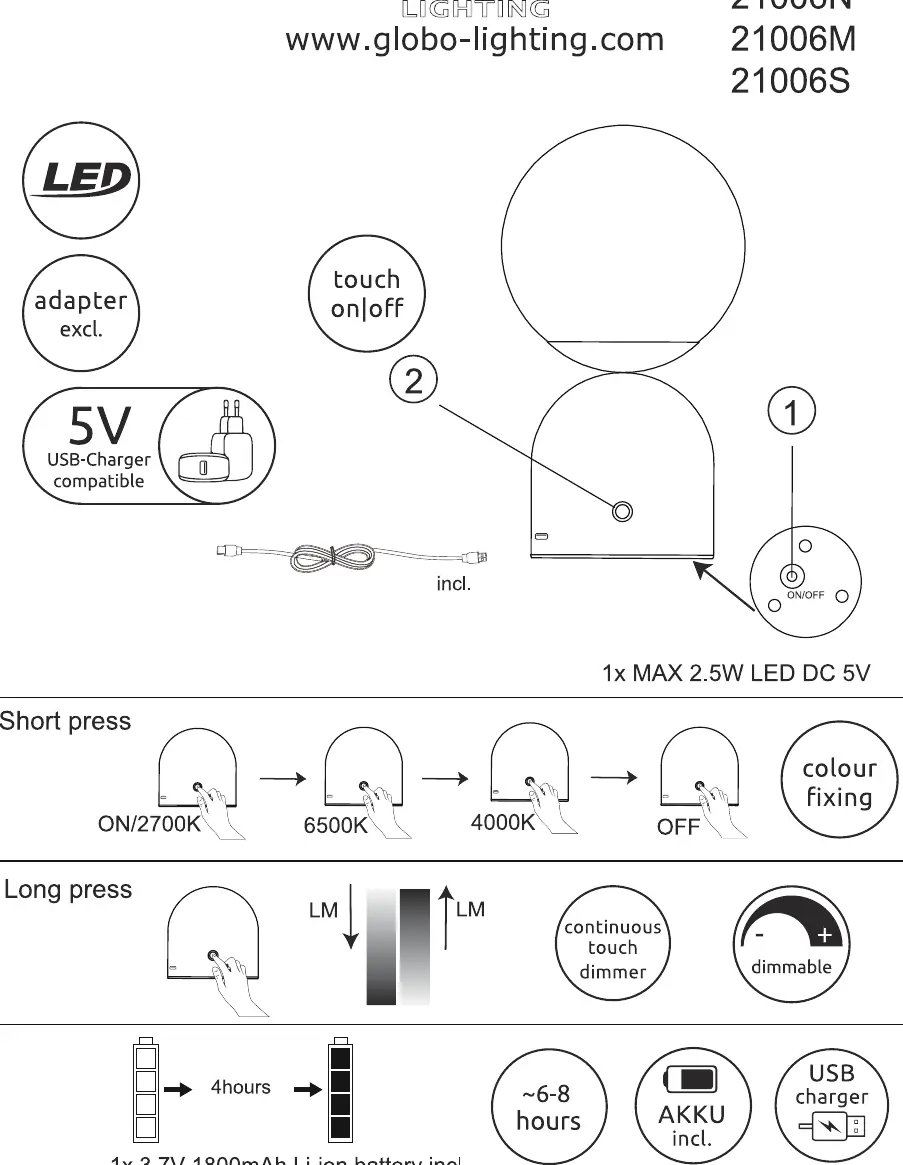
Controls and Operation
The lamp is operated via a touch-sensitive surface. Use the following gestures to control the light:
- Short press: Cycles through the light modes in the following order: ON (2700K) -> 6500K -> 4000K -> OFF.
- Long press: Activates the continuous touch dimmer. Holding the touch sensor allows you to adjust the brightness level.
Charging the Battery
The device includes a built-in 3.7V 1800mAh Li-ion battery. To charge the lamp:
- Use a compatible 5V USB charger.
- The charging time is approximately 6-8 hours.
- Ensure the device is connected to a power source using the provided cable.
Light Source Information
The light source in this product is non-replaceable. It is permanently integrated into the product design. The light source belongs to energy efficiency class F.
Manufacturer information
Globo Lighting
Practical help
Common problems
Ensure the battery is charged. Connect the lamp to a 5V USB charger for 6-8 hours.
Ensure you are using a 'long press' gesture on the touch sensor to activate the dimmer.
Before use
- Charge the battery fully before the first use (approx. 6-8 hours).
- Verify you have a 5V USB charger available.
- Ensure the lamp is placed on a stable surface.

Manual page author
Emily Carter
User documentation editor
Prepares concise manual descriptions and highlights the most useful setup, operation, and maintenance information for readers.