Instruction Manual for Table Lamp 21953S
Quick guide for the table lamp 21953S. Learn how to charge the battery, operate the touch controls, and understand the technical specifications.
Quick answers from the manual
Quick answer
- The lamp is charged via USB-C. A red light indicates charging, and a green light indicates a full charge. Charging takes 10-12 hours. p. 1
Key actions
- Charge the lamp using the USB-C port. p. 1
- Use the touch control on top of the shade to operate. p. 1
First start
- Charge the battery fully (10-12 hours) before first use. p. 1
Show 2 more answers Show less
Technical specifications
| Parameter | Value | Meaning | Pages |
|---|---|---|---|
| Input | 5V max 2A | Power requirement | p. 1 |
| Battery | 2x 18650 Li-ion 3.7V 2000mAh | Rechargeable battery type | p. 1 |
| Runtime (Max) | <= 5h | Operation time at max brightness | p. 1 |
| Runtime (Min) | <= 14h | Operation time at min brightness | p. 1 |
Where to find it in the PDF
- Instruction Sheet p. 1
Table of contents
Quick guide from the manual
This table lamp is operated via a touch control located on the top of the shade. It features a rechargeable battery system and is designed for indoor use.
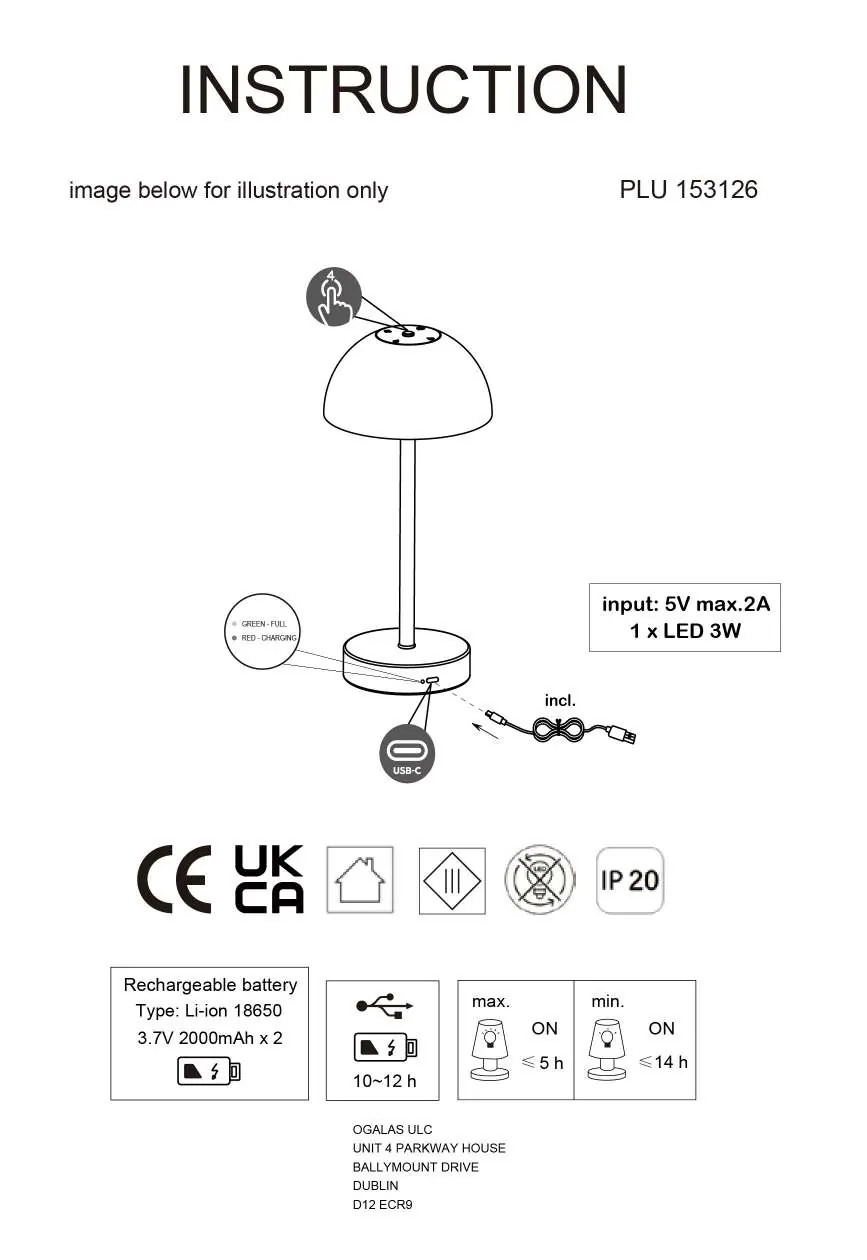
Charging the lamp
- Connect the provided USB-C cable to the charging port located on the base of the lamp.
- Charging Indicator: A red light indicates the lamp is currently charging. A green light indicates the battery is fully charged.
- Charging Time: The battery requires 10-12 hours to reach a full charge.
Operation
- Use the touch control on the top of the lamp shade to turn the light on/off and adjust brightness.
- Runtime: At maximum brightness, the lamp operates for up to 5 hours. At minimum brightness, it operates for up to 14 hours.
Technical Specifications
- Input: 5V max 2A.
- Light Source: 1 x LED 3W.
- Battery: 2 x Li-ion 18650, 3.7V 2000mAh.
- IP Rating: IP20 (Indoor use only).
Manufacturer information
Globo Lighting
Practical help
Common problems
Lamp not charging
Ensure the USB-C cable is securely connected to the port and that you are using a power source providing 5V max 2A.
Short battery life
Ensure the battery is fully charged (10-12 hours). Note that runtime depends on brightness settings (max 5h vs min 14h).
Before use
- Charge the lamp fully before first use.
- Verify the power source is 5V max 2A.
- Check the charging indicator light (Red = Charging, Green = Full).

Manual page author
David Miller
Documentation analyst