Instruction Manual for Globo 14990-4H1 HERMI I Pendant Light
Quick installation guide for the Globo 14990-4H1 HERMI I pendant light. Includes step-by-step mounting instructions, electrical connection details, and safety procedures for ceiling installation.
Table of contents
Quick guide from the manual
This document provides the essential steps for the safe installation of the Globo 14990-4H1 HERMI I pendant light. Before beginning, ensure the main power supply is switched off at the circuit breaker to prevent electrical shock.
Installation and mounting
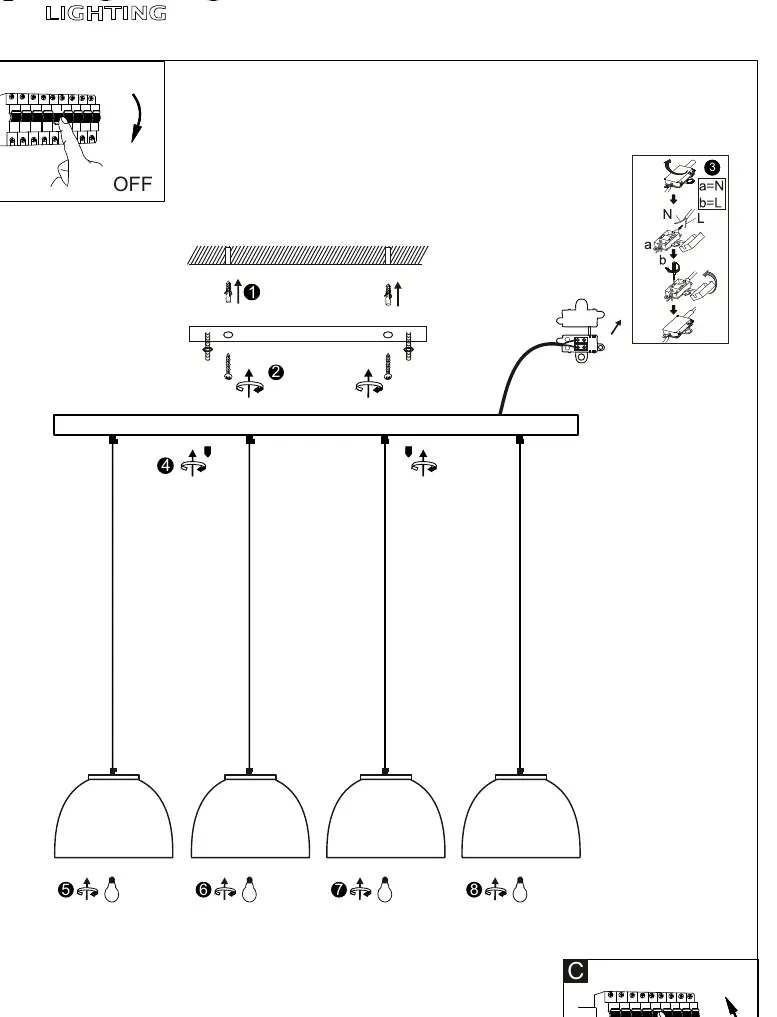
- Switch off the power supply at the main circuit breaker.
- Mark and drill holes in the ceiling to match the mounting bracket.
- Secure the mounting bracket to the ceiling using appropriate screws and anchors.
- Connect the electrical wires to the terminal block: ensure the Neutral (N) wire is connected to terminal 'a' and the Live (L) wire is connected to terminal 'b'.
- Attach the light fixture base to the mounting bracket.
- Install the four individual pendant shades onto the fixture base.
- Install the light bulbs into the sockets.
- Switch the power supply back on at the circuit breaker.
Safety
Always ensure the power is disconnected before performing any installation or maintenance work. If you are not familiar with electrical wiring, consult a qualified electrician.
Manufacturer information
Globo Lighting
Practical help
Common problems
Check if the circuit breaker is in the ON position and verify that the wires are correctly connected to the N and L terminals.
Before use
- Ensure the power is turned off at the main breaker
- Verify the ceiling structure can support the weight of the fixture
- Check that you have the correct tools for drilling and mounting
- Confirm the wiring matches the N (Neutral) and L (Live) markings on the terminal block

Manual page author
Michael Turner
Technical manual editor
Reviews PDF manuals for structure, safety notes, and practical product details so readers can find the right information quickly.