Instruction Manual for GLOBO 12380-18W LED Light
Quick guide for the GLOBO 12380-18W LED light, covering installation steps, wiring, and color temperature adjustment settings.
Table of contents
Quick guide from the manual
This document provides essential instructions for the installation and operation of the GLOBO 12380-18W LED light. The device features a 3-step color temperature switch. Please note that the light source and control gear are permanently integrated into the product and cannot be replaced.
Installation
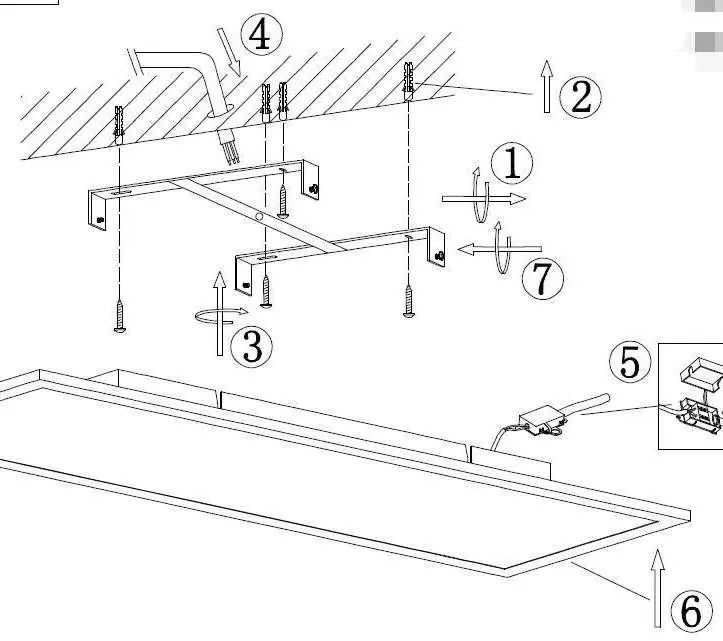
- Ensure the power supply is switched off at the main circuit breaker before starting any work.
- Mark and drill holes in the ceiling according to the mounting bracket dimensions.
- Secure the mounting bracket to the ceiling using appropriate screws and wall plugs.
- Pass the power supply cable through the opening in the bracket.
- Connect the power wires to the terminal block on the light fixture.
- Attach the light fixture to the mounted bracket.
Operation and Settings
The light is equipped with a 3-step switch that allows you to change the color temperature of the light:
- 3000K: Warm white light.
- 4000K: Neutral white light.
- 6500K: Cool daylight.
The color temperature can be adjusted using the integrated switch on the fixture.
Technical Specifications
The GLOBO 12380-18W model operates on 220-240V ~ 50Hz and has a maximum power consumption of 18W.
Manufacturer information
Globo Lighting
Practical help
Common problems
Check if the main circuit breaker is switched on and ensure all wiring connections are secure.
The LED light source and control gear are permanently integrated into the product design and are not user-replaceable.
Before use
- Ensure the power supply is turned off at the circuit breaker.
- Verify that the mounting surface is suitable for the fixture weight.
- Check that you have the necessary tools for drilling and mounting.
- Confirm the voltage matches the 220-240V requirement.

Manual page author
David Miller
Documentation analyst
Organizes user manual content into clear summaries, with attention to model details, product context, and everyday usability.