User Manual for Glocusent 16LEDs Clip-on Mini Book Light
Quick guide for the Glocusent 16LEDs Clip-on Mini Book Light. Learn how to operate the device, adjust brightness levels, switch color modes, and charge the battery properly.
Quick answers from the manual
Quick answer
- The Glocusent 16LEDs Clip-on Mini Book Light is operated via a power button, brightness adjustment buttons, and a color mode switch. It charges via USB Type-C and features 4 battery level indicators. p. 1
Key actions
- Charging the device p. 1
- Adjusting brightness p. 1
- Changing color mode p. 1
First start
- Charge the device until all 4 indicator lights turn blue. p. 1
Technical specifications
| Parameter | Value | Meaning | Pages |
|---|---|---|---|
| LED Beads | 16 | Number of LEDs | p. 1 |
| Battery | 1000 mAh | Rechargeable Lithium Polymer battery capacity | p. 1 |
| Charging Time | 2.5 hours | Time required for a full charge | p. 1 |
| Working Time | 8 - 80 hours | Battery life depending on settings | p. 1 |
Where to find it in the PDF
- Product Diagram and User Manual p. 1
Table of contents
Quick guide from the manual
For the first use, charge the device until all 4 indicator lights turn blue. Use the included USB Type-C cable for charging to ensure compatibility.
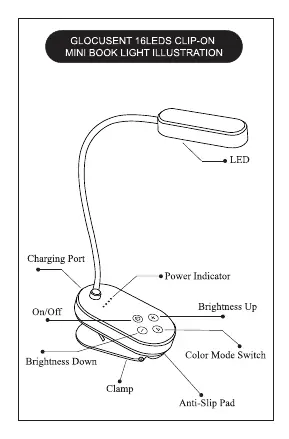
Operation
Power: Use the power button to turn the light on or off.
Brightness: There are 5 brightness levels. Use the "+" and "-" buttons to adjust. You can also long-press these buttons for stepless brightness adjustment.
Color Modes: Press the Color Mode Switch to cycle through three modes: Amber (1600K), Warm (3000K), and Natural (5000K).
Charging and Battery
The device features 4 power indicator lights on the panel that represent the remaining battery level. Use the included USB Type-C cable to charge. Charging takes approximately 2.5 hours for a full charge.
Technical Specifications
- LED Beads: 16
- Battery: Lithium Polymer 1000 mAh
- Charging Port: USB Type-C
- Working Time: 8 - 80 hours (depending on mode and brightness settings)
Practical help
Common problems
Ensure you are using the included USB Type-C cable or a third-party certified one.
Working time varies between 8 and 80 hours depending on the selected brightness and color mode settings.
Before use
- Charge the device fully before first use.
- Ensure all 4 indicator lights turn blue to confirm a full charge.
- Use the provided USB Type-C cable.

Manual page author
Michael Turner
Technical manual editor
Reviews PDF manuals for structure, safety notes, and practical product details so readers can find the right information quickly.