Tools / Generators
Goal Zero Yeti 1500X Portable Power Station User Guide
Comprehensive user guide for the Goal Zero Yeti 1500X Portable Power Station, covering setup, charging, operation, maintenance, and troubleshooting.
Table of contents
Product Overview
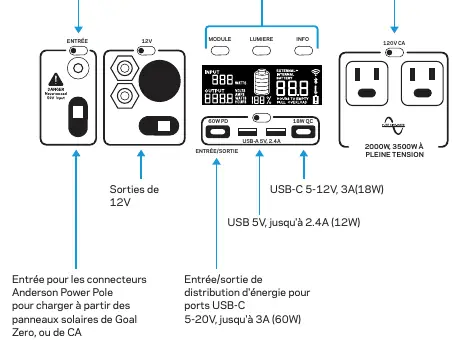
The Goal Zero Yeti 1500X is a high-capacity portable power station designed to provide reliable power anywhere. It features multiple output ports, including AC, 12V, and USB, to support a wide range of devices from smartphones to refrigerators.
Safety Instructions
Important: Read all instructions carefully before use to prevent injury or damage. Ensure the unit is used in a well-ventilated area and never obstruct the cooling vents. Keep the device clean, dry, and away from moisture to avoid electrical shock. Do not attempt to modify or replace the internal battery yourself, as this will void the warranty.
Getting Started
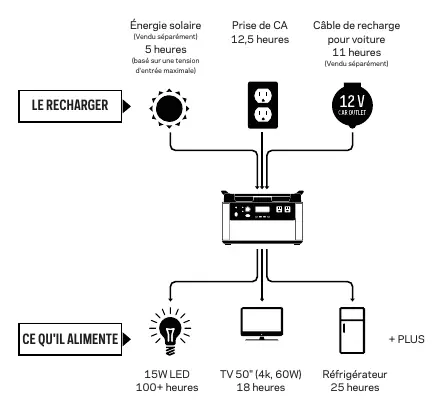
Before first use or storage, plug the Yeti into a wall outlet until it is fully charged. Keep the unit plugged in when not in use to ensure it is always ready. The Yeti can be charged via AC wall adapter, solar panels, or a 12V car charger. When charging, the LCD screen will display the current charge status and estimated time to full.
Operation
To use the Yeti, press the power button above the specific port you wish to use. A white light indicates the port is active. Ensure you turn off unused ports to conserve energy. The integrated LCD screen provides real-time data on power input, output, battery level, and estimated time to empty or full.
Maintenance and Storage
To maintain battery health, keep the Yeti connected to a power source whenever possible. If long-term storage is necessary, fully charge the unit every 3 months. Storing the unit in a cool, dry place is essential for longevity. If the unit has not been used for several months, it may require multiple charge cycles to restore accurate battery readings.
Troubleshooting
If devices are not charging, ensure the output port is active. A red light on a port indicates a short circuit; press the button again to reset. Check the LCD screen for warning icons such as OVERLOAD or temperature alerts. If issues persist, contact customer support.
Related manuals
Related manuals from the same brand or category.