Gourmetmaxx 02365 Hot Air Fryer User Manual
Quick guide for the Gourmetmaxx 02365 hot air fryer. Includes component identification, control panel overview, and basket operation instructions based on the device diagram.
Table of contents
Manual images
Click an image to enlargeImportant information from the manual
This document provides a visual overview of the Gourmetmaxx hot air fryer. Always keep the foldout page open while reading the full operating instructions to reference the device diagram and control panel.
Device Overview
The device consists of the following main components as identified in the diagram:
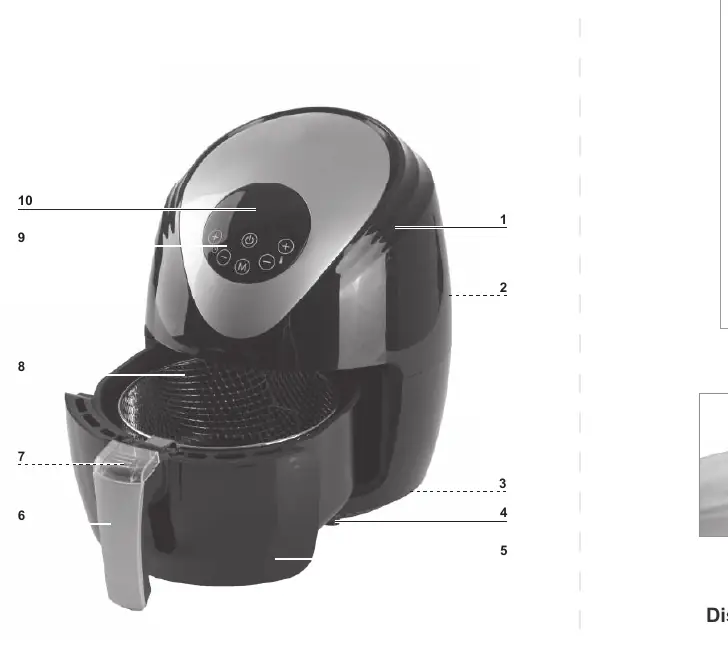
- 1: Air outlet
- 2: Housing
- 3: Power cable
- 4: Basket
- 5: Pan
- 6: Handle
- 7: Basket release button
- 8: Basket release cover
- 9: Display
- 10: Control panel
Control Panel
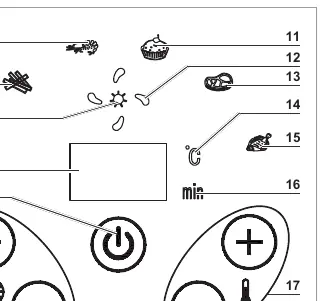
The control panel (10) features a digital display (9) and touch-sensitive buttons to adjust settings such as time and temperature. Refer to the diagram for the specific layout of the timer, temperature, mode, and start/stop controls.
Basket Operation
To safely remove the basket from the pan, follow these steps:
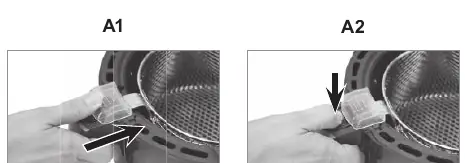
- Slide the basket release cover (8) upwards.
- Press the basket release button (7) located underneath the cover.
- Lift the basket out of the pan.
Optional Accessories
A bread baking basket is available as an optional accessory (Art. Nr. 00096).
Manufacturer information
GOURMETmaxx
Practical help
Common problems
Ensure the basket release cover (8) is fully slid upwards before pressing the release button (7).
Before use
- Ensure the device is placed on a stable, heat-resistant surface.
- Check that all packaging materials are removed from the device.
- Verify the basket is correctly inserted into the pan before operation.

Manual page author
Michael Turner
Technical manual editor
Reviews PDF manuals for structure, safety notes, and practical product details so readers can find the right information quickly.