Garden / Outdoor
Greenworks Optimow S / M Robotic Lawn Mower Quick Guide
Essential quick start and maintenance guide for Greenworks Optimow S and M robotic lawn mowers, covering setup, operation, and safety procedures.
Table of contents
Product Overview
The Greenworks Optimow S and M are advanced robotic lawn mowers designed for automated grass cutting. This guide provides the essential steps to get your device running efficiently and safely.
Getting Started
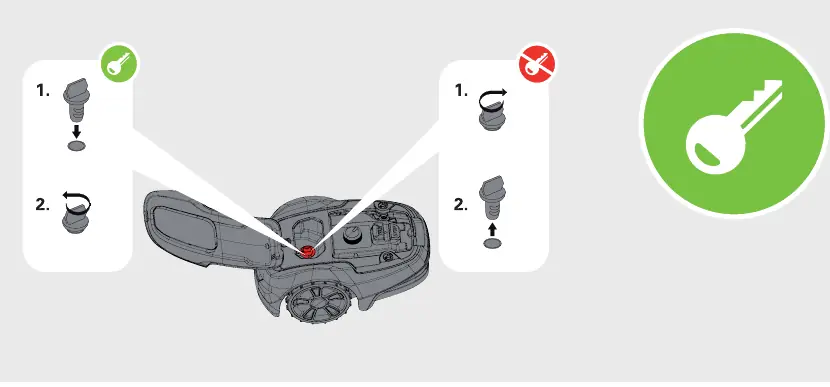
Begin by unpacking the device and carefully reviewing the full user documentation. Before performing any setup, ensure the mower is powered off. The device uses a safety key system; insert the key to enable operation or remove it to disable the mower for maintenance or storage. To power on the unit, locate the main switch and toggle it to the active position as indicated in the setup diagrams.
Operation and Connectivity
The Optimow series features integrated status indicators for connectivity, security, and system alerts. Users can manage and monitor the mower through the dedicated Greenworks mobile application, which is available for download on major app stores. Ensure your smartphone is connected to the mower to access advanced settings and scheduling features.
Maintenance and Safety
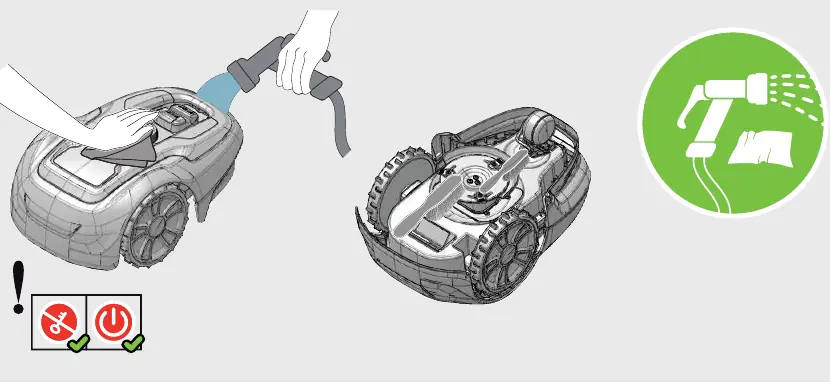
Regular maintenance is crucial for the longevity of your robotic mower. Always ensure the mower is switched off and the safety key is removed before handling. When cleaning, use a damp cloth or a gentle water spray to remove debris from the chassis and underside. Avoid using high-pressure washers. Periodically inspect the cutting blades for wear or damage. If blades need replacement, use a screwdriver to carefully remove the mounting screws. Always wear protective gloves when handling the cutting system to prevent injury. Keep the mower in a safe, dry location during off-season storage.
Troubleshooting and Support
If the mower displays warning lights or fails to operate, consult the status indicator panel on the device. Ensure the safety key is properly inserted and the main power switch is in the correct position. For persistent issues, refer to the mobile application for diagnostic information or contact customer support.
Related manuals
Related manuals from the same brand or category.
General / Other Manuals
Greenworks 1200W Electric Lawnmower
Greenworks
Manual page author
Michael Turner
Technical manual editor
Reviews PDF manuals for structure, safety notes, and practical product details so readers can find the right information quickly.