User Manual for Hall Technologies 200A 2-Port VGA Splitter
Quick guide for the Hall Technologies 200A 2-Port VGA Splitter. Learn how to install, configure EDID settings, and troubleshoot power issues with this compact video distribution amplifier.
Quick answers from the manual
Quick answer
- The 200A is a 2-channel VGA distribution amplifier with stereo audio and EDID management. It can be powered via the VGA source or an external 6V DC adapter. p. 2
Key actions
- Connect video source to input and displays to outputs. p. 3
First start
- Turn off equipment, connect cables, set EDID switch, power up. p. 3
Problems and fixes
Connect the supplied power adapter.
p. 3Technical specifications
| Parameter | Value | Meaning | Pages |
|---|---|---|---|
| Power | 6V DC, 300mA | External power requirement | p. 3 |
Where to find it in the PDF
- Product Overview p. 1
- Installation and Specs p. 3
Table of contents
Manual images
Click an image to enlargeQuick guide from the manual
The Hall Technologies 200A is a 2-channel VGA distribution amplifier designed to split video and audio signals. It features EDID management and can be powered by the VGA source or an external power adapter.
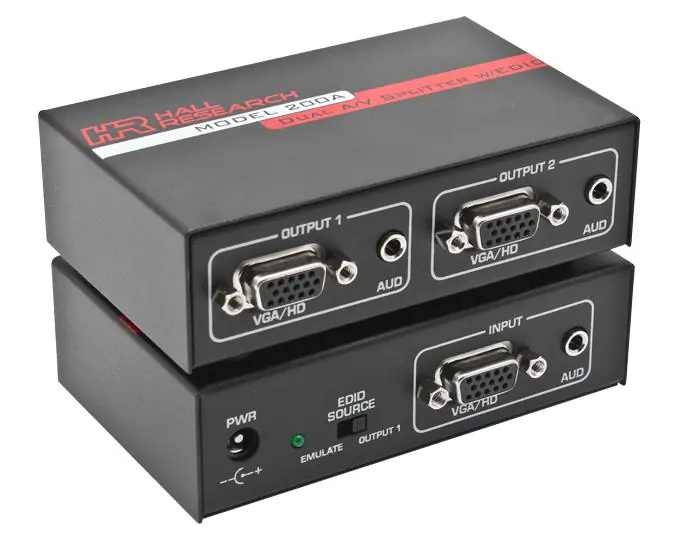
Installation

- Turn off all equipment and disconnect all cables.
- Connect your video source to the video input and the audio source to the 3.5mm jack using the included cables.
- Connect video OUTPUT 1 and 2 to your displays (LCD, projector, etc.) and audio to powered speakers or other devices.
- Set the EDID SOURCE switch on the unit (default is OUTPUT 1).
- Power up the displays and then the PC.
- If the green power light is not on, connect the supplied 6V DC power adapter.
EDID Management
The unit allows you to route EDID data from the LCD connected to OUTPUT #1 or use internal EDID memory. Use the recessed 2-position switch to select the desired routing.
Specifications
- Video Connectors: HD15 female
- Bandwidth: DC to 500 MHz
- Audio Connectors: 3.5mm mini-stereo
- Power: 6V DC, 300mA
Practical help
Common problems
The video source is not providing enough power. Connect the supplied 6V DC power adapter to the unit.
Before use
- Ensure all equipment is turned off before connecting cables.
- Verify you have the VGA and 3.5mm audio cables.
- Check if your video source provides power via VGA or if you need the external adapter.

Manual page author
David Miller
Documentation analyst
Organizes user manual content into clear summaries, with attention to model details, product context, and everyday usability.