Hama 180x180 cm Projection Screen User Guide
Quick guide for the Hama 180x180 cm projection screen. Learn how to set up the tripod, mount the screen, and detach the screen housing from the tripod stand.
Table of contents
Quick guide from the manual
This document provides instructions for the Hama 180x180 cm projection screen with a tripod. It covers the assembly dimensions and the procedure for removing the screen housing from the tripod stand for storage or transport.
Product overview
The projection screen is designed for use with the included tripod stand. The screen surface measures 180x180 cm. Ensure the tripod is placed on a flat, stable surface before use to prevent tipping.
Detaching the screen
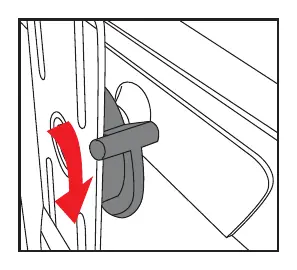
The screen housing can be removed from the tripod stand. To do this, locate the locking mechanism on the back of the screen housing. Follow the visual guide to release the hook from the tripod mount. Ensure you support the weight of the screen housing while releasing the mechanism to avoid damage.
Manufacturer information
Hama GmbH & Co KG
Practical help
Common problems
Ensure the hook mechanism on the back of the screen housing is fully engaged with the tripod mount.
Ensure the tripod legs are fully extended and placed on a level, flat surface.
Before use
- Place the tripod on a level, stable surface.
- Ensure the tripod legs are fully extended and locked.
- Check that the screen housing is securely attached to the tripod mount before extending the screen.
- Verify the screen surface is free of dust or debris before extending.

Manual page author
Michael Turner
Technical manual editor
Reviews PDF manuals for structure, safety notes, and practical product details so readers can find the right information quickly.