Protective Case for Apple Watch Hama 00210942IMA
Quick installation and removal guide for the Hama 00210942IMA protective case for Apple Watch. Follow these simple steps to clean your display and apply the case correctly.
Table of contents
Manual images
Click an image to enlargeQuick guide from the manual
This guide provides instructions for installing and removing the Hama protective case for Apple Watch. Before beginning the installation, ensure the smart watch display is clean and free of dust or debris to ensure a proper fit.
Installation
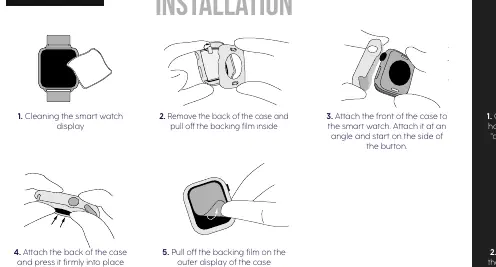
- Clean the smart watch display: Ensure the surface is completely clean.
- Prepare the case: Remove the back of the case and pull off the backing film from the inside.
- Attach the front: Place the front of the case onto the smart watch. Attach it at an angle, starting on the side with the button.
- Attach the back: Place the back of the case onto the watch and press it firmly into place.
- Finalize: Pull off the backing film on the outer display of the case.
Removal
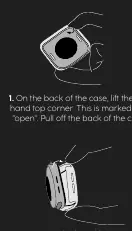
- Remove the back: On the back of the case, lift the left-hand top corner. This area is marked with "open". Pull off the back of the case.
- Remove the front: Lift the case on the side without buttons and pull off in the direction of the buttons.
Manufacturer information
Hama GmbH & Co KG
Practical help
Common problems
Ensure you are attaching the front part at an angle, starting from the side with the button.
Locate the corner marked 'open' on the back of the case to lift it off first.
Before use
- Clean the smart watch display thoroughly.
- Ensure the watch is powered off (optional but recommended).
- Remove all protective films from the case before final application.

Manual page author
Emily Carter
User documentation editor
Prepares concise manual descriptions and highlights the most useful setup, operation, and maintenance information for readers.