User Manual for Helvia LOUNGE-8A / 10A Slim Active Subwoofer
Quick guide for the Helvia LOUNGE-8A and LOUNGE-10A slim active subwoofers. Includes setup instructions, connection diagrams, control explanations, and technical specifications.
Table of contents
Manual images
Click an image to enlargeQuick Start and Important Information
The Helvia LOUNGE-8A and LOUNGE-10A are slim active subwoofers designed for floor use. Before operating, ensure the unit is connected to a 230V AC power source. The power switch must be in the ON position for the Auto Stand-by function to operate. If you experience distortion, reduce the volume level immediately to prevent damage.
Safety Precautions
- Protect the apparatus from moisture, rain, and heat sources.
- Do not obstruct ventilation openings.
- Ensure the power cord is protected from being walked on or pinched.
- Always connect the earth/ground pin.
- Do not insert fingers or objects into any openings.
- Refer all servicing to qualified personnel.
Unpacking
Ensure the following items are present in the package:
- 1x Active Subwoofer
- 1x IEC Power Cable
- 1x Stereo RCA Cable
- User Manual
Product Overview
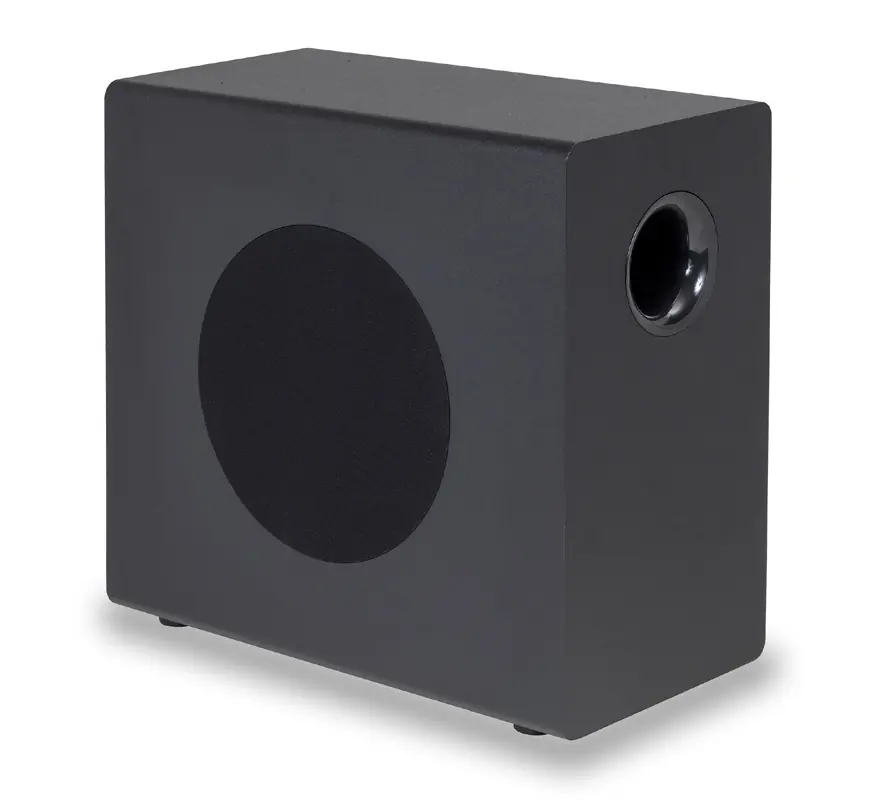
These subwoofers feature a Class-AB amplifier, auto-power function, limiter, and thermal/overload protection. They offer both stereo line inputs and stereo high-level inputs for flexible connectivity.
Rear Panel Controls
The rear panel contains the following controls:
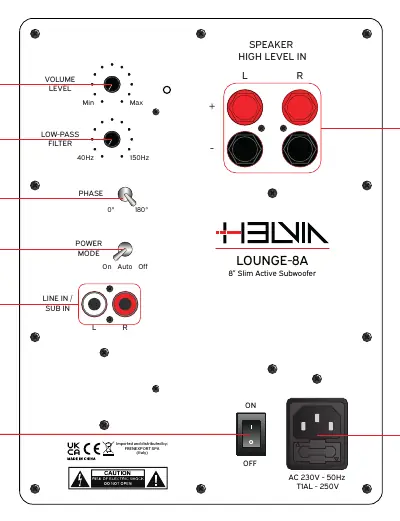
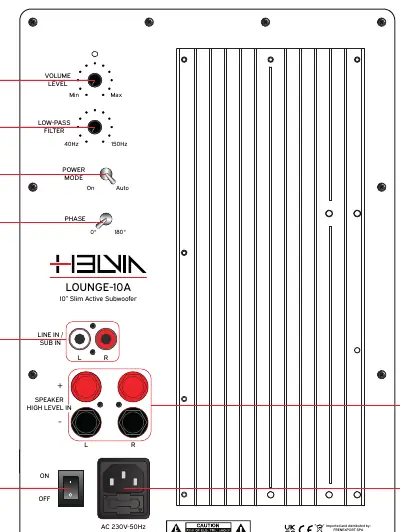
- Volume Level Knob: Adjusts the overall volume of the subwoofer.
- Low-pass Filter Knob: Adjusts the crossover frequency between 40Hz and 150Hz.
- Phase Toggle Switch: Sets the phase to 0° or 180° to correct potential phase mismatches with main speakers.
- Power Mode Toggle Switch: Controls power status (ON, AUTO, OFF). In AUTO mode, the unit enters standby after 2 minutes of no signal.
Installation and Connections
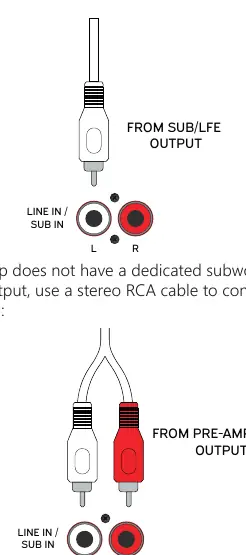
Line/Sub RCA Inputs: Use a mono RCA cable to connect a dedicated SUB/LFE output from an amplifier to the (L) input. Alternatively, use a stereo RCA cable to connect a pre-amplifier output to the L and R inputs.
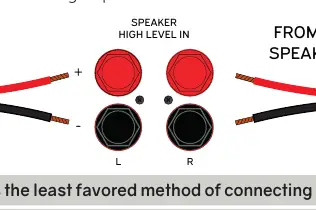
High-Level Stereo Inputs: If your amplifier lacks a dedicated subwoofer or pre-amp output, connect the stereo speaker outputs of your amplifier to the High-Level Stereo Inputs using speaker wires. Ensure polarity (+ to +, - to -) is correct to avoid unnatural sound.
Technical Specifications
LOUNGE-8A: 8" woofer, 100W Peak Power, 40Hz-500Hz frequency response, 4 ohm impedance.
LOUNGE-10A: 10" woofer, 200W Peak Power, 35Hz-500Hz frequency response, 8 ohm impedance.
Warranty and Disposal
Products are covered by warranty according to European regulations (2 years for private, 1 year for companies). Do not dispose of the product with household waste; deliver it to a designated WEEE collection center.
Practical help
Common problems
Reduce the volume level immediately. The subwoofer may be driven into 'clipping'.
Check if speaker polarity is inverted (+ connected to -). Ensure correct polarity.
Ensure the main Power Switch (6) is in the ON position.
Try flipping the Phase Toggle Switch to the other position (0° or 180°).
Before use
- Check package contents for all cables.
- Verify the power source is 230V AC.
- Ensure the power switch is OFF before making connections.
- Check that speaker wire polarity is correct if using High-Level inputs.
- Ensure the subwoofer is placed away from heat sources.
Specs in practice
- Crossover Frequency
- Adjusts the frequency range the subwoofer handles (40Hz-150Hz).
Images and diagrams
- Rear panel shows Volume, Low-pass Filter, Phase, Power Mode, and Input connections.
- RCA connection diagram shows mono (SUB/LFE) and stereo (Pre-amp) wiring options.
- High-Level connection diagram shows wiring from amplifier speaker outputs to the subwoofer.
Model compatibility
- Requires 230V AC power supply.
- High-Level inputs are the least favored connection method.
- Only use recommended fuse types (T1AL-250V for 8A, T2AL-250V for 10A).

Manual page author
David Miller
Documentation analyst
Organizes user manual content into clear summaries, with attention to model details, product context, and everyday usability.