Cordless Stapler N14DSL / N18DSL User Manual
Quick guide for the HiKOKI N14DSL and N18DSL cordless staplers. Includes safety instructions, operation modes (single/continual shot), maintenance, and troubleshooting.
Table of contents
Manual images
Click an image to enlargeQuick guide from the manual
This manual provides instructions for the HiKOKI N14DSL and N18DSL cordless staplers. Always read the safety warnings before use.
Battery Removal and Installation
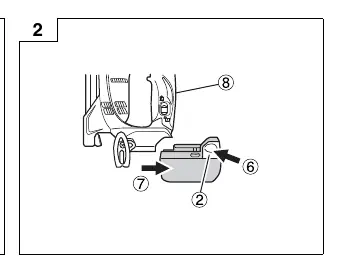
Hold the handle tightly and push the battery latch to remove the battery. To install, insert the battery while observing its polarities.
How to use the Cordless Stapler
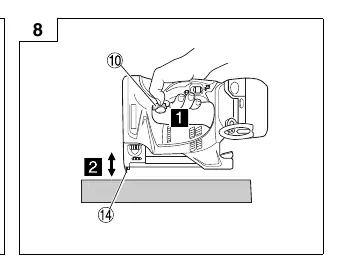
There are two ways to discharge staples:
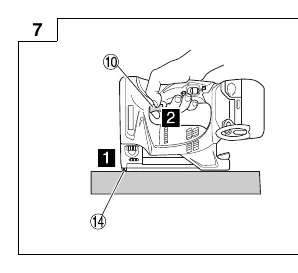
- Single-shot: Place the push lever against the area where the staple is to be fired, then pull the trigger.
- Continual-shot: Pull the trigger first, then place the push lever against the area to repeatedly fire staples.
Safety Devices
Staples cannot be fired unless both the push lever and the trigger are simultaneously operated.
Maintenance and Inspection
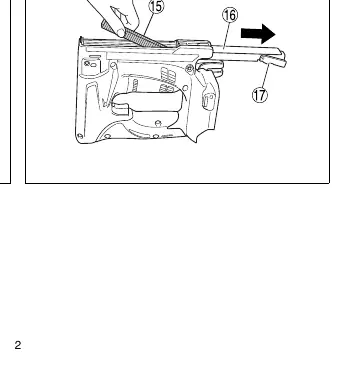
Always lock the trigger and remove the battery before maintenance. Regularly inspect mounting screws and clean the magazine of adhesive, fragments, and splinters.
Troubleshooting
If the tool does not operate normally, check the battery, ensure it is attached correctly, and inspect for jammed staples or worn driver blades.
Manufacturer information
HiKOKI
Practical help
Common problems
Check if the battery is charged, attached correctly, or if the trigger was released halfway in single-shot mode.
Material may be too hard, the stapler may be recoiling (press harder), or the driver blade may be worn.
Check if the anti-blank firing mechanism is working, remove jammed staples, or check if the driver blade is worn.
Before use
- Check for loose screws
- Check for damaged or missing parts
- Check push lever operation
- Ensure trigger is locked when not in use

Manual page author
Emily Carter
User documentation editor
Prepares concise manual descriptions and highlights the most useful setup, operation, and maintenance information for readers.