Hilti AG 100-7S Angle Grinder Carbon Brush Replacement Guide
A step-by-step visual guide for replacing carbon brushes on Hilti AG 100-7S, AG 115-7S, AG 100-8S, and AG 115-8S angle grinders. Includes safety precautions and maintenance steps.
Table of contents
Quick guide from the manual
This document provides visual instructions for replacing the carbon brushes on Hilti angle grinders. Always disconnect the power supply before performing any maintenance. Ensure you have the correct replacement brushes for your specific model before starting.
Carbon brush replacement procedure
Follow these steps to replace the carbon brushes:
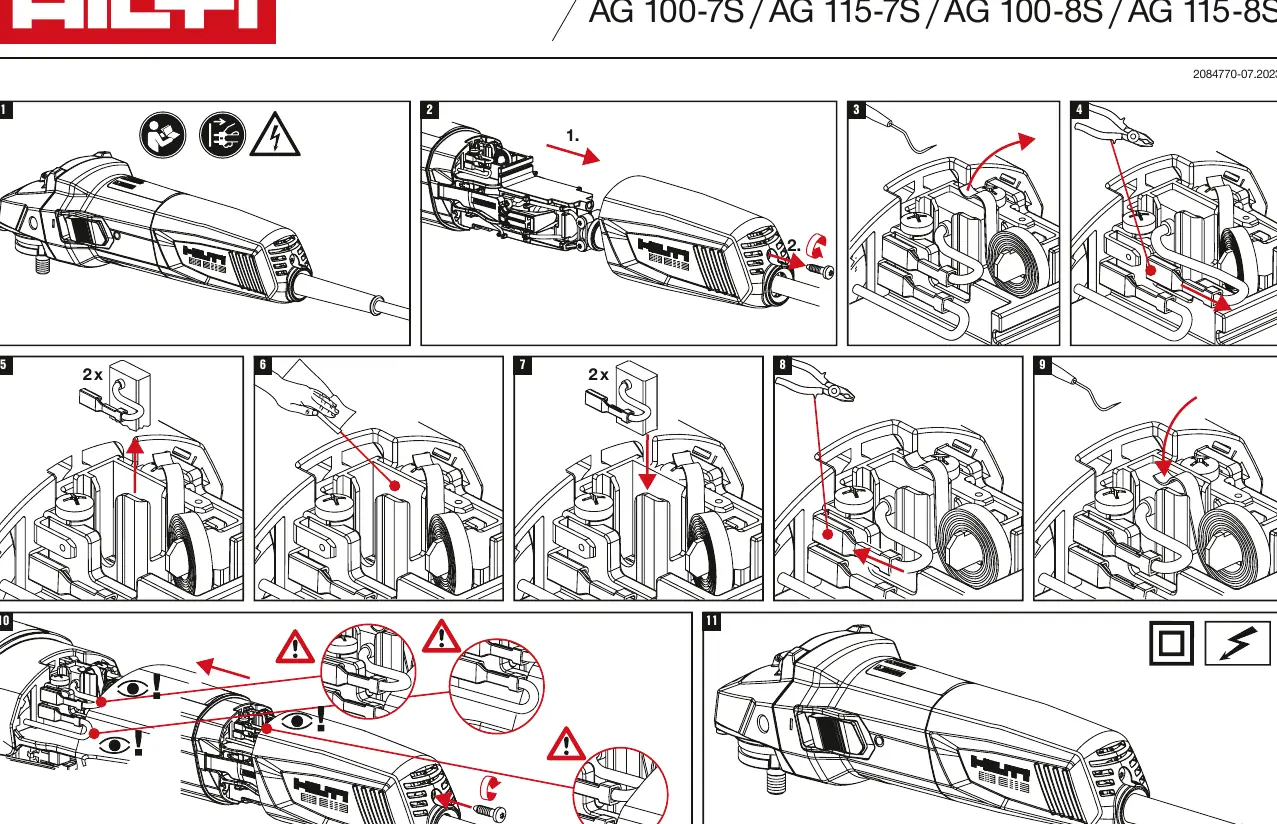
- Safety First: Ensure the tool is unplugged from the power source.
- Open Housing: Carefully open the rear housing of the angle grinder.
- Remove Old Brushes: Use appropriate tools to remove the worn carbon brushes.
- Install New Brushes: Insert the new carbon brushes into the brush holders.
- Check Connections: Ensure all internal wires are routed correctly and are not pinched. Verify that all connections are secure.
- Close Housing: Reassemble the housing and secure it properly.
Safety warnings
Do not attempt to open the tool while it is connected to power. Ensure that all internal wiring is positioned correctly during reassembly to prevent short circuits or damage to the tool. If you are unsure about the procedure, contact a professional service center.
Manufacturer information
Hilti Corporation
Practical help
Common problems
Check if the carbon brushes are worn out and require replacement.
Ensure the carbon brushes are seated correctly and that no wires are damaged or pinched.
Before use
- Disconnect the power plug from the mains.
- Ensure you have the correct replacement carbon brushes for your model.
- Use appropriate tools to open the housing.
- Verify that the workspace is clean and well-lit.

Manual page author
Emily Carter
User documentation editor
Prepares concise manual descriptions and highlights the most useful setup, operation, and maintenance information for readers.