Hisense Smart Refrigerator Photo Wall User Guide
Learn how to upload and display personal photos on your Hisense smart refrigerator screen using the Photo Wall feature. Follow this step-by-step guide for Bluetooth transfer and setup.
Manual images
Click an image to enlargeQuick Guide to Photo Wall Setup
This guide explains how to display personal photos on your Hisense smart refrigerator screen. The process involves accessing the Album app on the refrigerator and transferring images from your mobile device via Bluetooth.
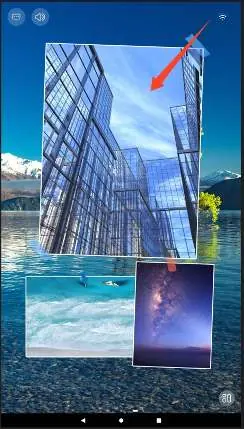
Step-by-Step Photo Upload
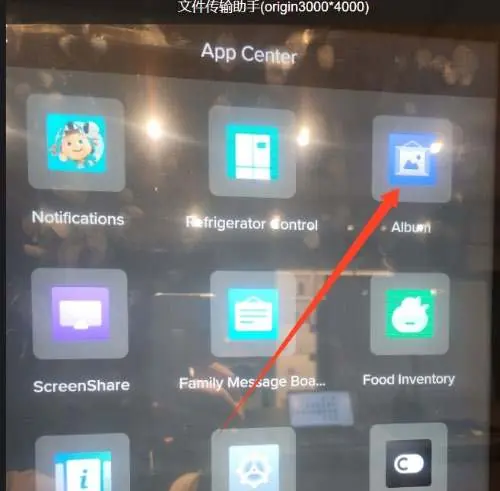
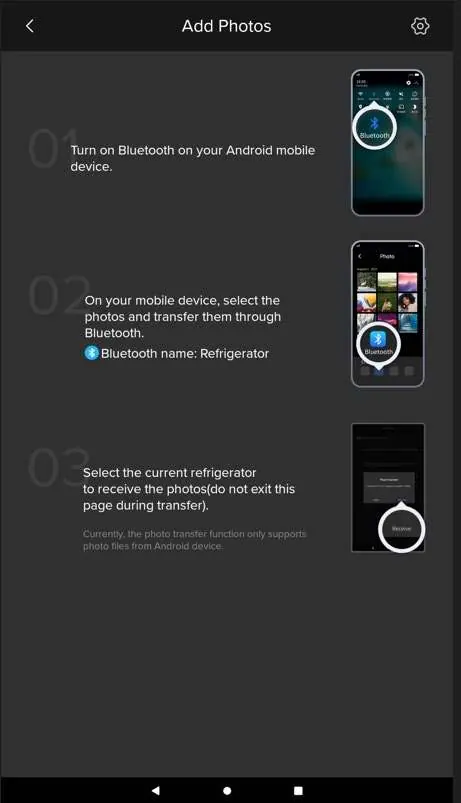
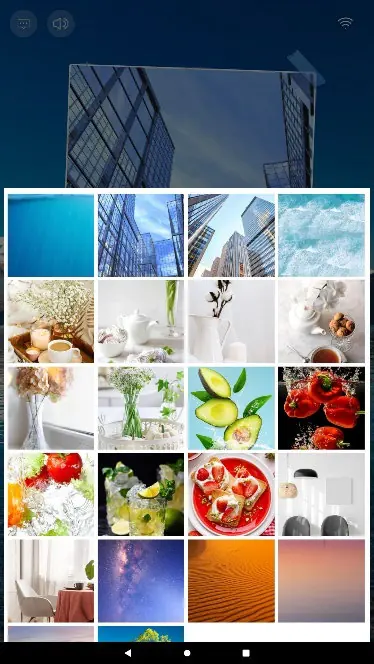
- Access the Album: On the refrigerator home screen, navigate to MY APPS and select Album.
- Initiate Upload: Click the + button within the Album interface.
- Transfer via Bluetooth: On your Android mobile device, turn on Bluetooth. Select the photos you wish to transfer and share them via Bluetooth. Select the device named Refrigerator.
- Receive Files: Ensure you remain on the transfer page on the refrigerator screen while the files are being received.
- Set the Photo: Return to the refrigerator home screen and swipe to the second page. Tap the photo area you wish to change.
- Finalize: Locate your uploaded photo at the bottom of the photo list, select it, and confirm the change.
Manufacturer information
Hisense
Practical help
Common problems
Ensure the transfer was completed successfully and check that you are looking at the bottom of the photo list.
Ensure you are sending files from an Android device, as the current function only supports Android.
Before use
- Ensure your mobile device has Bluetooth enabled.
- Verify your mobile device is an Android device.
- Ensure you are on the home screen of the refrigerator.
- Have the photos you wish to transfer ready on your mobile device.

Manual page author
Emily Carter
User documentation editor
Prepares concise manual descriptions and highlights the most useful setup, operation, and maintenance information for readers.