User Guide for Hobbywing 80A-4in1-Lite-AT Electronic Speed Controller
Quick guide for the Hobbywing 80A-4in1-Lite-AT ESC. Includes wiring diagrams for motors and flight controllers, start-up procedures, and firmware configuration details.
Table of contents
Manual images
Click an image to enlargeQuick guide from the manual
This guide provides essential information for the Hobbywing 80A-4in1-Lite-AT Electronic Speed Controller. It covers wiring, start-up procedures, and firmware configuration. Please ensure you have the correct LiPo battery (4-8S) and follow the wiring diagrams carefully to avoid damage.
Specifications
- Continuous Current: 80A
- Peak Current (10sec): 100A
- BEC: None
- LiPo Compatibility: 4-8S
- Weight: 41.3g
- Dimensions: 56.1 x 52 x 7 mm
Wiring and Installation
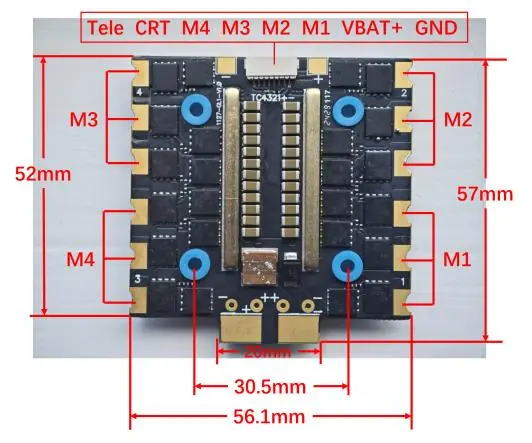
The ESC features specific pads for motor and flight controller connections. Ensure all connections are secure and correctly mapped to the corresponding motor outputs (M1-M4) and flight controller pins (Tele, CRT, VBAT+, GND).
Start-up Process
To start the motor, the ESC must detect a zero throttle signal. This completes the arming sequence. Once the arming sequence is finished, the motor will run.
Firmware and Configuration
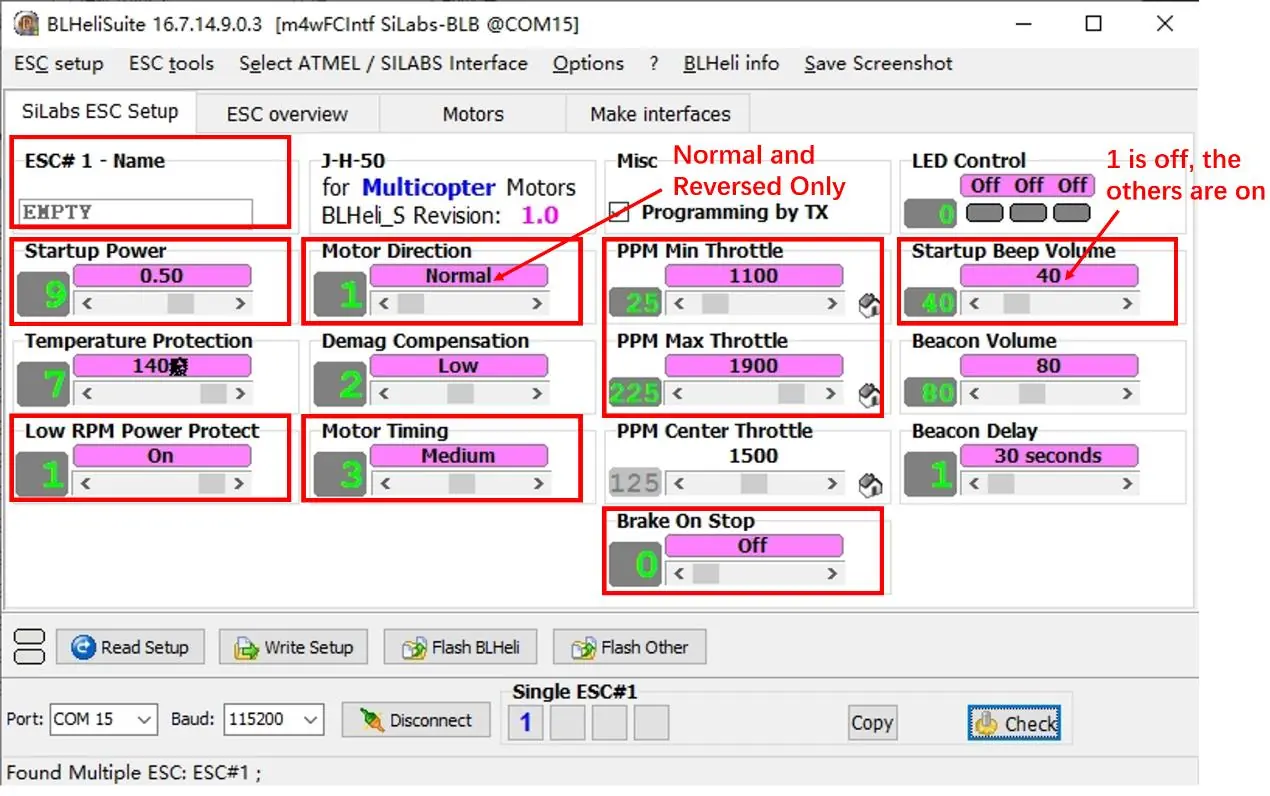
This product uses self-developed firmware. Note that BLHeli_32 is not available as the BLHeli company has closed. You can download BLHeliSuite16xx for configuration. For detailed parameter adjustments, refer to the official BLHeli documentation.
Manufacturer information
Hobbywing
Practical help
Common problems
Ensure the transmitter is sending a zero throttle signal to complete the arming sequence.
The product uses self-developed firmware. Use the provided BLHeliSuite16xx link for configuration.
Before use
- Verify LiPo battery compatibility (4-8S).
- Ensure correct wiring of motors (M1-M4) and flight controller.
- Check for zero throttle signal from the transmitter.
- Download BLHeliSuite16xx for firmware configuration.

Manual page author
David Miller
Documentation analyst
Organizes user manual content into clear summaries, with attention to model details, product context, and everyday usability.