Automotive / Parts Accessories
Holman 140mm Smart Flood Light Twin Pack
Enhance your outdoor space with the Holman 140mm Smart Flood Light Twin Pack. Featuring Bluetooth Mesh technology, RGBW color options, and easy app control for scheduling and scenes.
Table of contents
Product Overview
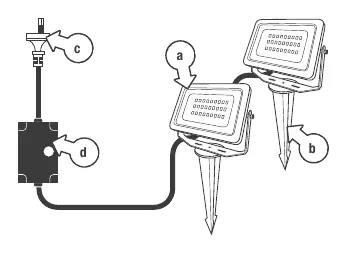
The Holman 140mm Smart Flood Light Twin Pack provides versatile outdoor lighting with smart control capabilities. The package includes two 6W Bluetooth Mesh floodlights, ground spikes, wall mounting hardware, and a plug-in power supply. These lights are designed for outdoor use with an IP65 rating for the lights and IP67 for the DC adaptor.
Setup and Installation
Ensure your power point is within 3 meters of the installation site. The lights can be mounted using the included ground spikes or wall hardware. Before connecting, verify that the red O-ring is in place for electrical protection and securely screw down the threaded cover on the plug connection. Once connected, plug the power cord into the power point. The lights should flash white, indicating they are in pairing mode. If they do not, toggle the power point on/off/on/off/on.

App Pairing
Download the Holman Home app and create an account. Ensure Bluetooth and location permissions are enabled on your mobile device. In the app, select Add Device and follow the prompts to pair your lights via Bluetooth Mesh. Once paired, you can control the lights individually or as a group.
Operation and Features
The Holman Home app offers several features for your floodlights:
- Dimmer: Adjust brightness and select between RGB or white light modes.
- Pallete (Scene): Apply preset lighting scenes to individual lights.
- Music: Sync light colors to the beat of your music using your device's microphone.
- Schedule: Set automated on/off timers using 24-hour time formats.
- Timer: Set a countdown for the lights to turn off.
Troubleshooting
If you experience connection issues, ensure you are within Bluetooth range. Only one user can control the lights at a time; if another user is connected, you may need to wait for them to exit. To remove a device, navigate to the device settings in the app and select Remove Device. This will reset the light to pairing mode.
Technical Specifications
- Input: 240V AC
- Output: 12V DC
- Light Output: 6W per light (12W total)
- Brightness: 1040lm
- Waterproof Rating: IP65
- Housing: Metal
Related manuals
Related manuals from the same brand or category.
Automotive / Parts Accessories