Automotive / Parts Accessories
Holman 140mm Smart Flood Light Twin Pack User Guide
Quick setup and operation guide for the Holman 140mm Smart Flood Light Twin Pack, including Bluetooth pairing, app configuration, and troubleshooting.
Table of contents
Manual images
Jump to the sectionQuick guide from the manual
This document provides instructions for the Holman 140mm Smart Flood Light Twin Pack (Product Code: SWC2000). The system uses Bluetooth Mesh technology for control via the Holman Home app. Ensure your power source is within 3m of the light setup, as no cable extensions or modifications are permitted.

Package content
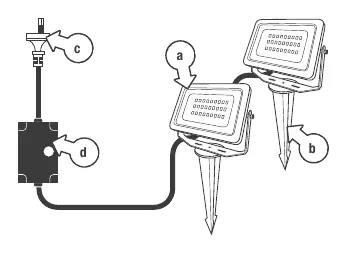
- 2 x 6W Bluetooth Mesh Flood Lights (IP65)
- 2 x Ground Spikes
- Wall mounting hardware
- Plug-in Power Supply with DC Adaptor (IP67)
Setup and installation
Preparation:

- Ensure the power point is within 3m of the light setup.
- Attach ground spikes by hand or use the swivel bracket for wall mounting.
- Connect the floodlights to the cable, ensuring the red O-Ring is in place for electrical protection.
- Screw down the threaded cover onto the plug connection after connecting.
Pairing:
- Download the Holman Home app from the App Store or Google Play.
- Plug in the power cord. The lights should flash white (pairing mode). If not, toggle the power point on/off/on/off/on.
- Enable Bluetooth and location permissions on your mobile device.
- In the app, tap Add Device. The lights should appear under Discovering devices.
- Tap Add or Add All to begin pairing.
Functions
The Holman Home app allows for:
- Dimmer: RGB/W mode and color selection.
- Pallete (Scene): Apply preset scenes to individual lights.
- Music: Lights change color to the beat (requires microphone permission).
- More: Includes scheduling, timers, and default light state settings.
Troubleshooting
- Control issues: Only one user can control the lights at a time. If another user has control, the Bluetooth symbol will appear with a cross.
- Removing device: Tap the '...' menu in the app and select 'remove device'. This will disconnect the device and return it to pairing mode.
- Support: For further assistance, visit support.holmanindustries.com.au, email [email protected], or call 08 9416 9999.
Technical specifications
- Input: 240V AC
- Output: 12V DC
- Light Output: 6W per light (12W total)
- Brightness: 1040lm
- Waterproof Rating: IP65
- Housing: Metal
Official resources from the manual
Practical help
Common problems
Lights are not in pairing mode (not flashing white)
Toggle the power point on/off/on/off/on to force the lights into pairing mode.
Cannot control the lights from the app
Ensure only one user is connected at a time. If another user is in control, they must exit the app first.
Bluetooth symbol appears greyed out
You are out of Bluetooth range. Move closer to the lights to regain control.
Before use
- Ensure power point is within 3m of the light setup.
- Do not use extension cords or modify the power cable.
- Verify the red O-Ring is in place on the cable connection.
- Ensure Bluetooth and location permissions are enabled in the Holman Home app.
- Check that the lights are flashing white to indicate pairing mode.
Specs in practice
- Bluetooth Mesh
- Allows the lights to communicate with each other and the app without a cloud connection.
Images and diagrams
- The power supply consists of a plug, a 90cm cable to the DC adaptor, and a 3m cable from the adaptor to the first light.
- The red O-Ring is critical for maintaining the IP67/IP65 waterproof rating of the connections.
Model compatibility
- Requires iOS or Android mobile device with Bluetooth.
- App requires audio recording permission for the Music feature.
- Device does not support cloud connection; all data is stored locally.

Manual page author
David Miller
Documentation analyst
Organizes user manual content into clear summaries, with attention to model details, product context, and everyday usability.