Holmes 16-inch (40cm) Oscillating Stand Fan
User guide for the Holmes 16-inch oscillating stand fan, covering assembly, operation, safety instructions, maintenance, and troubleshooting.
Table of contents
Product Overview
The Holmes 16-inch (40cm) Oscillating Stand Fan is designed for household use to provide effective air circulation. It features adjustable height, oscillation, and tilt settings to customize airflow throughout your home.
Safety Instructions
- Always unplug the fan before cleaning or when not in use.
- Do not operate the fan with a damaged cord or plug.
- Keep the cord away from high-traffic areas and do not run it under carpeting.
- Do not use the fan outdoors or in the presence of flammable fumes.
- This appliance features a polarized plug to reduce the risk of electric shock.
- The fan includes overload protection via a replaceable fuse in the plug.
Assembly
Ensure all parts are removed from the packaging before assembly. The process involves attaching the extension pole to the base, assembling the fan head by securing the rear grill, fan blade, and front grill, and finally attaching the fan head to the pole.
Operation
Place the fan on a dry, level surface and plug it into a standard 120V AC outlet. Use the speed control knob on the motor housing to select between Off, Low, Medium, or High settings. To enable oscillation, push the oscillation knob down; pull it up to stop.
Adjustments
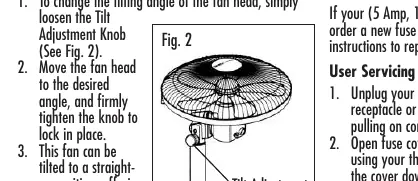
The fan head can be tilted to direct airflow upward for whole-room circulation by loosening the tilt adjustment knob. The unit can also be converted into a floor fan by removing the extension pole.
Cleaning and Maintenance
Always unplug the fan before cleaning. Use a soft, moist cloth to clean the exterior. Do not use harsh chemicals like gasoline or benzene. If the fuse blows, replace it with a 5 Amp, 125 Volt fuse by sliding open the fuse cover on the plug.
Storage
The fan can be stored assembled or partially disassembled in a dry location. Protect the fan head from dust during storage.

Manual page author
David Miller
Documentation analyst
Organizes user manual content into clear summaries, with attention to model details, product context, and everyday usability.