Honeywell D743 8V 0.5A Transformer
Quick start guide for the Honeywell D743 8V 0.5A transformer, including essential installation and wiring instructions for safe setup.
Table of contents
Quick Start Guide
This document provides the essential steps for installing the Honeywell D743 transformer. Please ensure you follow all safety precautions before beginning the installation process.
Installation and Wiring
Before starting, ensure that the mains power supply is completely disconnected to prevent electrical shock.
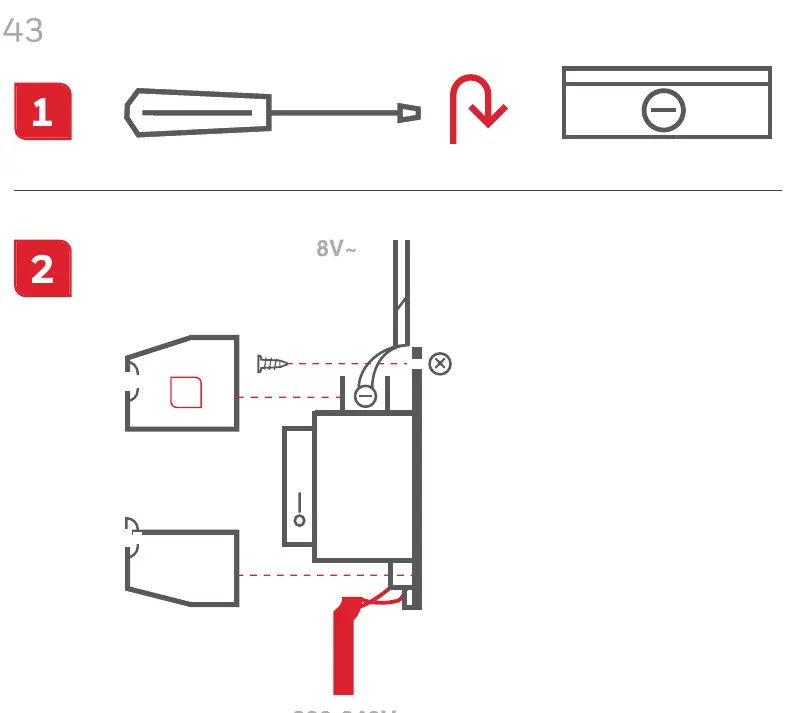
- Step 1: Use a screwdriver to access the terminal block of the transformer.
- Step 2: Connect the 220-240V mains input to the primary side of the transformer. Connect the 8V output to your low-voltage device as indicated in the wiring diagram.
Support
For additional information or troubleshooting, please visit the official support website at livewell.honeywell.com.
Official resources from the manual
Manufacturer information
Honeywell International Inc.
Practical help
Common problems
Verify that the input power (220-240V) is active and check that all wiring connections to the terminal block are secure.
Before use
- Ensure mains power is switched off before installation
- Verify input voltage is 220-240V
- Check wiring diagram for correct terminal connection
- Ensure the screwdriver used is appropriate for the terminal screws

Manual page author
Emily Carter
User documentation editor
Prepares concise manual descriptions and highlights the most useful setup, operation, and maintenance information for readers.