Installation and Programming Guide for Honeywell Vista 20SE with Uplink 5530M
Quick guide for wiring and programming the Honeywell Vista 20SE alarm panel with the Uplink 5530M cellular communicator. Includes wiring diagrams and keypad programming steps.
Quick answers from the manual
Quick answer
- This guide provides instructions for wiring the Uplink 5530M cellular communicator to a Honeywell Vista 20SE alarm panel and programming the panel via the keypad to enable Contact ID reporting. p. 1, 2
Key actions
- Wire the 5530M to the Vista 20SE panel p. 1
- Program the panel via keypad to enable Contact ID p. 2
Where to find it in the PDF
- Wiring Diagram p. 1
- Programming Steps p. 2
Table of contents
Manual images
Click an image to enlargeImportant Information
This document provides instructions for connecting the Uplink 5530M cellular communicator to the Honeywell Vista 20SE alarm panel. It is strongly advised that an experienced alarm installer performs the programming to ensure proper performance and full functionality. The installer must complete full panel testing and signal confirmation. Note that Open/Close reporting must be enabled during the initial pairing procedure.
Wiring the 5530M Communicator
Follow the wiring diagram provided in the document to connect the 5530M communicator to the Vista 20SE panel. Ensure that no wiring is routed over the circuit board to prevent damage or interference.

Programming the Alarm Panel
The panel must be programmed via the keypad to enable Contact ID reporting. Follow these steps:
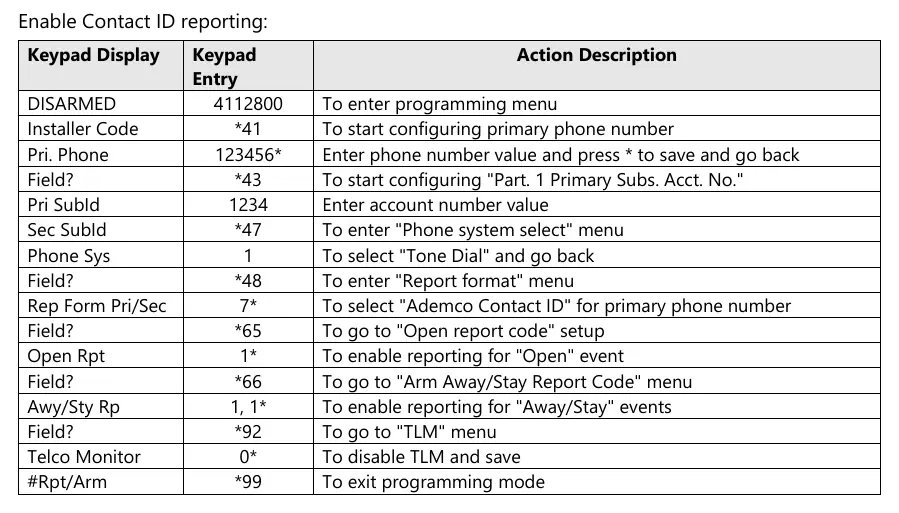
- Enter programming mode using the installer code (default 4112800).
- Configure the primary phone number using *41.
- Set the account number using *43.
- Select "Tone Dial" in the phone system menu (*47).
- Set the report format to "Ademco Contact ID" (*48).
- Enable "Open" and "Away/Stay" report codes (*65, *66).
- Disable TLM (*92) and exit programming mode (*99).
Manufacturer information
Honeywell International Inc.
Practical help
Common problems
Ensure Open/Close reporting is enabled during the initial pairing procedure.
Before use
- Ensure an experienced alarm installer performs the programming.
- Verify all wiring is routed correctly and not over the circuit board.
- Complete full panel testing and signal confirmation after installation.

Manual page author
David Miller
Documentation analyst
Organizes user manual content into clear summaries, with attention to model details, product context, and everyday usability.