Power / Batteries Chargers
Honeywell Voyager 1400g Series Area-Imaging Scanner
User guide for the Honeywell Voyager 1400g series area-imaging scanner, covering installation, interface programming, configuration, and maintenance.
Table of contents
Product Overview
The Honeywell Voyager 1400g is an area-imaging scanner designed for high-performance 2D barcode reading. It is capable of reading even low-quality barcodes and images. The device is rated IP42 for protection against foreign particles and dripping water.
Getting Started
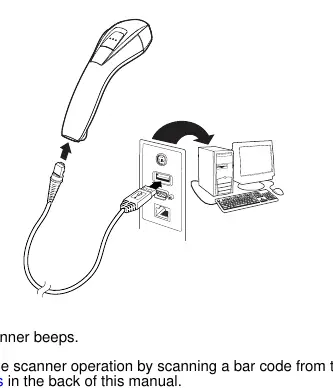
The scanner supports various connection interfaces, including USB, Keyboard Wedge, RS232 Serial, and RS485. To set up the device, connect the appropriate interface cable to the scanner and the host terminal. For USB connections, the device defaults to a USB PC Keyboard. For Keyboard Wedge, ensure the terminal is powered off before connecting. For RS232, ensure the correct cable is used for your specific terminal type.
Operation and Programming
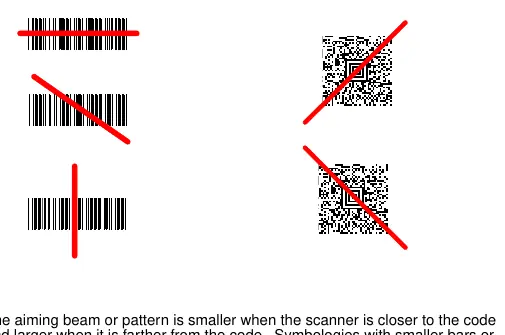
The scanner is programmed by scanning specific configuration barcodes found in this guide. Users can set custom defaults, adjust beeper volume and pitch, configure good read indicators, and set manual or presentation trigger modes. The device also supports advanced data editing, such as adding prefixes and suffixes, and data formatting to modify the scanner's output.
Maintenance
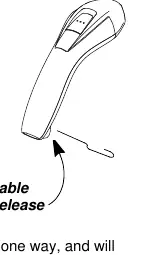
To ensure reliable operation, keep the scanner's window clean using a soft cloth or lens tissue dampened with water or a mild detergent solution. Do not use abrasive materials or solvents like alcohol or acetone, as these can damage the housing or window. Periodically inspect cords and connectors for wear. If the scanner is not functioning correctly, perform a self-test by power cycling the unit or refer to the troubleshooting section to verify cable connections and symbology settings.
Safety and Compliance
The device complies with various international standards, including FCC Part 15 Class B, Industry Canada ICES-003, and CE marking. The LED illumination is classified as an EXEMPT RISK GROUP according to IEC 62471:2006. To avoid heat-related injuries, do not touch sections of the scanner that feel warm during operation.
Related manuals
Related manuals from the same brand or category.
Computers / Printers
Honeywell Hyperion 1300g Handheld Linear Scanner User's Guide
HoneywellComputers / Printers
Honeywell Voyager 1250g Single Line Laser Scanner User Guide
HoneywellDocuments / Warranty Safety
Honeywell Voyager 1250g Single-Line Laser Scanner Quick Start Guide
HoneywellComputers / Printers