Binding Procedure Manual for Horizon Apprentice S 2 1.2m
Quick guide for the binding procedure of the Horizon Apprentice S 2 1.2m RC aircraft. Learn how to correctly bind your receiver to the transmitter using the provided bind plug extension.
Quick guide from the manual
This document provides the specific binding procedure for the Horizon Apprentice S 2 1.2m. Binding is the process of teaching the receiver the specific code of your transmitter so it connects only to that device. The aircraft features a bind port extension located in the battery compartment, allowing you to bind without removing the wing assembly.
Binding Procedure
Follow these steps to bind your receiver to the transmitter:
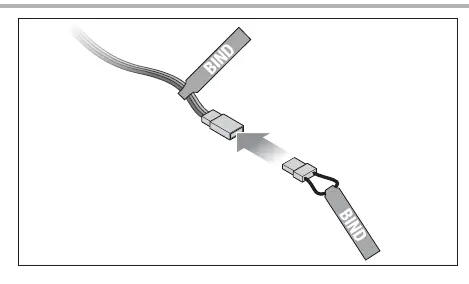
- Insert the bind plug into the open end of the extension marked BIND.
- Connect the flight battery to the ESC. The orange receiver LED will flash continuously, indicating the receiver is in bind mode.
- Power on the transmitter while holding the transmitter bind button or switch. Refer to your transmitter's manual for specific binding instructions.
- The bind process is complete when the orange LED on the receiver turns solid.
- Remove the bind plug from the extension.
Manufacturer information
Horizon Hobby
Practical help
Common problems
Ensure the transmitter bind button or switch was held down during the entire power-up sequence of the transmitter.
Check that the bind plug is fully inserted into the extension port and that the battery is properly connected to the ESC.
Before use
- Ensure the transmitter is powered off before starting the binding process.
- Locate the bind plug extension inside the battery compartment.
- Have your transmitter manual ready to identify the specific bind button or switch location.
- Ensure the flight battery is charged.

Manual page author
David Miller
Documentation analyst
Organizes user manual content into clear summaries, with attention to model details, product context, and everyday usability.