horizont 14495E Fence Tester User Manual
Quick guide for the horizont 14495E fence tester. Learn how to perform voltage checks, interpret LED indicators, and maintain the device using a 9V battery.
Table of contents
Quick guide from the manual
The horizont 14495E is a handheld fence tester designed for quick and easy voltage checks on electric fences. The device does not require external grounding, as the user's body acts as the reference point during measurement.
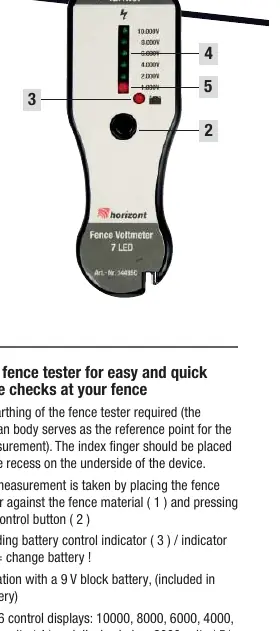
Operation
To perform a voltage check:
- Place your index finger in the recess located on the underside of the device.
- Press the fence tester against the fence material.
- Press the control button to initiate the measurement.
Interpreting Results
The device features 6 LED indicators to display the voltage level:
- 10,000V to 2,000V: Indicated by green lights.
- Below 2,000V: Indicated by a red light.
Battery and Maintenance
The device operates on a 9V block battery (included). A dedicated battery control indicator is provided on the device. If the battery indicator light turns red, the battery must be replaced immediately to ensure accurate readings.
Manufacturer information
horizont group gmbh
Practical help
Common problems
Replace the 9V block battery immediately.
Ensure your index finger is correctly placed in the recess on the underside of the device to provide a reference point, and ensure firm contact with the fence material.
Before use
- Ensure a 9V block battery is installed.
- Check that the battery indicator is not red.
- Ensure you are in direct contact with the device's underside recess for grounding.

Manual page author
Emily Carter
User documentation editor
Prepares concise manual descriptions and highlights the most useful setup, operation, and maintenance information for readers.